Arduino controlled wheelchair

Power wheelchair board for REAL info!

POWERCHAIR MENU! www.wheelchairdriver.com/powerchair-stuff.htm

Re: Arduino controlled wheelchair

Postby gcebiker » 24 Sep 2015, 14:09

I am thinking i probably should shoot over to the Arduino forums for some coding help, tho i guess there are some coding guru's lurking about here too.

here is the next rewrite for anyone interested, don't worry about the massive errors in the code
its just to show where i am trying to head (if you are a code head..which i am not..who would have guessed hey :o )

I am SUPER aware that this will run the initialization sequence on power up and immediately start outputting to serial (well i hope it will)

I am going to hook the Arduino up the Logic4 for testing
... not the power chair itself,
i want to see the wave forms match or how far they vary from each other and tweak it.

Code: Select all
#define INHPIN  11  // well its not used for testing this code as yet but will need inhibit at some point
#define JSIGPIN 1   // TX pin
#define LEDPIN  13  // Other output pin to connect to Jazzy line that pulses 255 all the time ?
#define pwrBtn  7  // On/Off button Digital Pin 4, has internal pull up resistor ? or was that pull down ?

unsigned char data[10];
unsigned long timer = 0;
int Ypin = A0;
int Xpin = A1;
int YpinValue;
int XpinValue;
int startYvalue = 192;
int startXvalue = 192;


void setup() {


  // Dynamic Shark initialization sequence
  // Bytes starting with (0x60) are Joystick in put data
  // Bytes starting with (0x74) are initialization packets
  // (0x0F) is the end packet notification, delays mostly 10ms till Joy has ( booted up ? 3.3seconds)
  // then settles to a delay of 17.16ms
Serial.begin(38400, SERIAL_8E1);

  digitalWrite (JSIGPIN, HIGH);   // Power button pressed On (from off state)
  delay(293);
  digitalWrite (JSIGPIN, LOW);
  delay(10);

  // Fist packet of data sent from Joystick
  Serial.write((0x74), (0x82), (0x85), (0x82), (0x80), (0x88), (0xCD), (0xA0), (0x80), (0x8D), (0x0F));
  delay(1);
  Serial.write((0x05), (0x80), (0xFA));
  delay(1);
  Serial.write(0x0F);

  // delay till next group of data
  delay(1);

  // Second group of data
  // Appears to be Joystick raw data reads/reads after interpretation by Wizard Software settings
  Serial.write((0x60), (0xC0), (0xBF), (0xFF), (0xCD), (0x80), (0x8C), (0x80), (0xC8), (0x0F));
  delay(2);

  // Third group of data
  // Inhibit files ? till joystick has booted up fully ?
  // All inhibit bytes start with (0x61) and stop after 3.3seconds
  Serial.write((0x61), (0x80), (0x80), (0xC0), (0x80), (0x80), (0x80), (0x80), (0xDE));
  delay(0)

  // End bits are (0x0F)
  Serial.write(0x0F)

  // now a cycle of Joystick (0x060), inhibit/raw/controller values (0x61) continues till 3.3seconds
  // Then a steady stream of Joystick data with 17.16ms delay between bytes of data.
  // Start bit, 8 data bits, End Bit
  // Start bit " ' "(0x60)   Address ?
  // Bit 1 "192"(0xC0)   Y axis data
  // Bit 2 "192"(0xC0)   X axis data
  // Bit 3 "255"(0xFF)   Speed max setting
  // Bit 4 "192"(0xC0)   Speed fine tune ?
  // Bit 5 "128"(0x80)   Horn off/ 130on
  // Bit 6 "140"(0x8C)   Joystick on ?
  // Bit 7 "128"(0x80)   Chair mode (128drive/129tilt)
  // Bit 8 "212"(0xD4)   Some other XY modifier ?
  // End Bit "15"(0x0F)   End packet

  // is 3.2 seconds of data packets necessary ?
  // would not a "if bit 1 <>='192'(0xC0)" then inhibit enable ? suffice

}

pinMode(pwrBtn, INPUT_PULLUP);
pinMode(LEDPIN, OUTPUT);
pinMode(INHPIN, OUTPUT);


void loop() {
  //read the value from the Y axis on port A0
  YpinValue = analogRead(Ypin);

  //read the value from the X axis on Port A1
  XpinValue = analogRead(Xpin);

  ///build serial packet
          data[0]= (0x60);    // Joystick packets start with this " ' " not accepted had to use hex
          data[1]= YpinValue; // Joystick Y value     
          data[2]= XpinValue; // Joystick X value
          data[3]= 255;       // Max speed setting via turtle/hare buttons on joystick
          data[4]= 192;       // Speed Fine Tune ?
          data[5]= 128;      // default horn off, horn on value is 130
          data[6]= 140;      // joystick On Value ?
          data[7]= 128;      // chair mode/ drive 128, tilt/aux output 129
          data[8]= 212;      // some other XY modifier..maybe acceleration/de settings
          data[9]= 15;        // all packets end with this identifier     
          data[10]=0xff-(data[0]+data[1]+data[2]+data[3]+data[4]);    //-Check sum
        for(unsigned char i=0;i<11;i++);
  Serial.write(data[i]);
                //


}
User avatar
gcebiker
 
Posts: 879
Joined: 11 Jul 2015, 14:20
Location: Gold Coast, Queensland, Australia.

Re: Arduino controlled wheelchair

Postby LROBBINS » 24 Sep 2015, 20:16

I think you're right in thinking that the Arduino forum is a better place to go for help with this. You will have to explain what you are trying to do, and then, if you want to post code you know can't work do make sure to say that it is a sort of pseudocode, or put it in proper Arduino syntax first.
Ciao,
Lenny
LROBBINS
 
Posts: 5807
Joined: 27 Aug 2010, 09:36
Location: Siena, Italy

Re: Arduino controlled wheelchair

Postby gcebiker » 25 Sep 2015, 02:47

Going to learn how to write library files.

I hope, once learning the Shark Controller to then move onto other power chair controllers and do Libraries for each.
So i may as well start learning now.

Its going to make the code a lot easier to read at the very least.
User avatar
gcebiker
 
Posts: 879
Joined: 11 Jul 2015, 14:20
Location: Gold Coast, Queensland, Australia.

Re: Arduino controlled wheelchair

Postby gcebiker » 28 Sep 2015, 16:46

I think i have gotten over the coding hump that i have been stuck on for a few days.

This is a picture of the emulated wave form, its nearly perfect compared to the original, now for a little tweaking.

I am thinking now to just put the Arduino inline with the Master Joystick and modify the values with relation to distance from objects.
(...I've got to get it working first hey...lol)

I think one of the easiest and least controlling ways would be to use the fourth Byte (the master speed dial / turtle / hare button) to turn down the max speed as an object was approached, till it reached to close.

Ill have to allow room for when the castor swivels side to side or reversing would still wipe out the skirting on a wall.

Using the factory joy will at least leave all the safety, charging and other benefits it has.
Fortunately Ive an OEM programmer and mine works exactly as suits me.

A big shout out and thank you to Doug, I did not completely understand your array sections but once i understood that it all be came clear.
That and needing Software Serial.h (myRX, myTX, true) to invert the data signal (to match the factory Shark Joystick)
Rather than using the Hardware Serial port.

I think understanding this may make it possible for me to even get the Wii and the Serial output on the one Arduino working...dam i am excited !
Image
User avatar
gcebiker
 
Posts: 879
Joined: 11 Jul 2015, 14:20
Location: Gold Coast, Queensland, Australia.

Re: Arduino controlled wheelchair

Postby gcebiker » 30 Sep 2015, 15:27

Doug, i think i jumped the gun yesterday, test code was incomplete /doh forgot to map inputs and properly define the integers.

..so much to learn, so ...much time ? :ugeek:

For the original poster of this thread, and anyone else tagging along.
Here is the current build of the test code, comes out correctly on the Logic4.

Many many other packets are missing, this is just to test wiring and digital output on the Logic Analyzer.

..i wish there was a spell checker in the Arduino IDE.

Code: Select all
// This sketch is to emulate the packet of data that the Shark Joystick sends
/******************************************************************************
    * Author: Tony Matthews ammatthews at gmail dot com
    * License: FreeBSD
    ******************************************************************************/
/******************************************************************************
Copyright (c) 2015, Tony Matthews
All rights reserved.

Redistribution and use in source and binary forms, with or without
modification, are permitted provided that the following conditions are met:

1. Redistributions of source code must retain the above copyright notice, this
   list of conditions and the following disclaimer.
2. Redistributions in binary form must reproduce the above copyright notice,
   this list of conditions and the following disclaimer in the documentation
   and/or other materials provided with the distribution.

THIS SOFTWARE IS PROVIDED BY THE COPYRIGHT HOLDERS AND CONTRIBUTORS "AS IS" AND
ANY EXPRESS OR IMPLIED WARRANTIES, INCLUDING, BUT NOT LIMITED TO, THE IMPLIED
WARRANTIES OF MERCHANTABILITY AND FITNESS FOR A PARTICULAR PURPOSE ARE
DISCLAIMED. IN NO EVENT SHALL THE COPYRIGHT OWNER OR CONTRIBUTORS BE LIABLE FOR
ANY DIRECT, INDIRECT, INCIDENTAL, SPECIAL, EXEMPLARY, OR CONSEQUENTIAL DAMAGES
(INCLUDING, BUT NOT LIMITED TO, PROCUREMENT OF SUBSTITUTE GOODS OR SERVICES;
LOSS OF USE, DATA, OR PROFITS; OR BUSINESS INTERRUPTION) HOWEVER CAUSED AND
ON ANY THEORY OF LIABILITY, WHETHER IN CONTRACT, STRICT LIABILITY, OR TORT
(INCLUDING NEGLIGENCE OR OTHERWISE) ARISING IN ANY WAY OUT OF THE USE OF THIS
SOFTWARE, EVEN IF ADVISED OF THE POSSIBILITY OF SUCH DAMAGE.

The views and conclusions contained in the software and documentation are those
of the authors and should not be interpreted as representing official policies,
either expressed or implied, of the FreeBSD Project.

*******************************************************************************/

// This code is incomplete and still under revision.
// Its also got junk that may not be needed,
// Early testing phases.
// Successful output of Data packet for Shark Wheelchair controller.
// Not tested on chair, just on the Logic Analyzer.
// Pulse at one second for testing, chair sends pulse every 17ish microseconds

#include <SoftwareSerial.h>

#define rxPin 10      // Digital Pin10 for Receive from controller.
// this will have to be changed for the GCDuiNode as it uses this pin to communicate with the RF24

#define txPin 11      // Digital Pin11 Transmit from Shark Joystick to Controller.

// int sharkDataInt [10];    //Declare size of data packet sent from Shark Joystick
int joyStartByte;    //  was/is to setup/call function from new "void sharkJoyInt" .h file yet to be written.

// Names for Pins and what they are connected to
const int yPot = A0;    // Y Pot input value
const int xPot = A1;    // X Pot input value

// not used yet but will be one day...not that i ever dial my chair down...what's the point of going slow :P
int maxPot = A2;      // Max speed dial pot


// Names for analogRead values of Analog Pots
int yPotVal;
int xPotVal;
int maxSpeedVal;

// Names for Mapped analogRead Values of Pots
int yPotValMapped;
int xPotValMapped;


// Size of data packet, tho the packets are not constrained to this size.
// This size for this packet but probably not for others.
unsigned char data[10];
unsigned long timer = 0;

// set up a new serial port
SoftwareSerial sharkSerial (rxPin, txPin, true);    // TRUE sets this to invert software serial output.


void setup()  {
  // define pin modes for tx, rx:
  pinMode(rxPin, INPUT);
  pinMode(txPin, OUTPUT);

  // set the data rate for the SoftwareSerial port
  sharkSerial.begin(38400);
}
void loop() {
  // the brackets above and below are for the packet of data
  // below is the packet of data i would like to test there are notes next to what the
  // current thinking is as to the function of each piece of data
  // Logic4 Async serial inverted logic sniffer is attached to pins
  //  RX and TX on Arduino Nano V3.0
  {
    yPotVal = analogRead(yPot);
    xPotVal = analogRead(xPot);
    yPotValMapped = map(yPotVal, 0, 1023, 128, 255); // Map min/max pot values to match min/max original Shark joystick values.
    xPotValMapped = map(xPotVal, 0, 1012, 128, 255); // Map X values
  }
  {
    //build serial packet
    data[0] = (0x60);   // Joystik packets start with this " ' " not accepted had to use hex
    data[1] = yPotValMapped; // Joystick Y value
    data[2] = xPotValMapped; // Joystick X value
    data[3] = 255;      // Max speed setting via turtle/hare buttons on joystick
    data[4] = 192;      // Speed Fine Tune ?
    data[5] = 128;     // default horn off, horn on value is 130
    data[6] = 140;     // joystick On Value ?
    data[7] = 128;     // chair mode/ drive 128, tilt/aux output 129
    data[8] = 212;     // some other XY modifier..maybe acceleration/de settings
    data[9] = 15;       // all packets end with this identifier

    for (unsigned char i = 0; i < 10; i++)
    {
      sharkSerial.write(data[i]);

    }
  }

  delayMicroseconds(1716);    //Delay next packet 17ms input from Shark joystick

}

User avatar
gcebiker
 
Posts: 879
Joined: 11 Jul 2015, 14:20
Location: Gold Coast, Queensland, Australia.

Re: Arduino controlled wheelchair

Postby gcebiker » 01 Oct 2015, 01:54

On chair testing of Logic 4 of above code

No response from motor controller - Both Original and Emulator are joined at same time.

Only one powered on at a time, Emulator not sending packets correctly...nearly but first two bytes get framing errors.
(found problem....i forgot to ground the Logic4 to the emulator /slaps self in head), transmitting " ' " correctly

-- With Joystick and emulator both powered, Chair motor controller only responds after the 't' packet is sent...which is the factory on signal..so no surprise there.

Ill now rewrite the code to send the 't' packet and see if i get correct Async response from Shark Motor controller..

Image
User avatar
gcebiker
 
Posts: 879
Joined: 11 Jul 2015, 14:20
Location: Gold Coast, Queensland, Australia.

Re: Arduino controlled wheelchair

Postby gcebiker » 01 Oct 2015, 03:12

Rewrote code, emulator sending the "t" packets.

Getting this return...just a reflection of same, and RX line is Low from start not high as it should be

Image


Below is the Logic Capture i am trying to replicate (TX from Joystick is CH3, RX CH2)
Notice that RX is High, "spiking" (because its an inverted signal), to low on the trailing edge of each High.

Anyone with any ideas as to reason for this ?

Image
User avatar
gcebiker
 
Posts: 879
Joined: 11 Jul 2015, 14:20
Location: Gold Coast, Queensland, Australia.

Re: Arduino controlled wheelchair

Postby gcebiker » 01 Oct 2015, 14:52

Hi Brendan,

For people that dont know Brendan, he's a freakin awesome guy.

Brendan, this is ONE of the forums i am posting my work on for ADDING control to Power wheelchairs.
Yeah the QLogic is crap, everyone that has one knows its's over controlled.

The chair makes it appear you are more fucked up than you are.
Hell knows its bad enough to be trapped in your own brain.

Mad worse for a 'Qualified' person to recommend a chair that exacerbates your own internal issues...
Is not tech, not to make your life an order of magnitude easier ?

WE are PEOPLE inside, trapped in an electric chair by people that DO NOT UNDERSTAND.
WE DO NOT NEED CONTROL, we need interpretation...and the line is crossed with the Qlogic, myself and Brendan and countless others were stranded with.

A chair that takes your input and puts you into a Door frame.
Skinning your Knuckles as it goes,

Dynamic, your control...is over control.
Take out the LAG, give real input in real time.

EVEN the most brain injured of us, deserve a level playing field.

If our brains are slow, don't slow them more by shackles of code !

I RIPPED your guts out of my chair, what an over priced piece of crap programming.
The electrics are OK, i replaced them with the Dynamic Shark...

Don't Shackle your consumers,
We have a voice now wheelchairdriver.com , i just wish more of the disabled voices out there knew about it.

Power Chair People take notice.
The time of supply of goods, made by the able for the disabled.
IS OVER, future profits, come from taking NOTICE NOW.

Listen to your consumers.
User avatar
gcebiker
 
Posts: 879
Joined: 11 Jul 2015, 14:20
Location: Gold Coast, Queensland, Australia.

Re: Arduino controlled wheelchair

Postby Burgerman » 01 Oct 2015, 15:00

You realise that this:

QLogic is crap, everyone that has one knows its's over controlled.


Much like every controller, is simply due to adding turn acc and low speed turn acc, and turn dec and low speed turn dec, to every system on every chair as a default setting?

An OEM level programmer allows you to set these 4 settings to 100 instead and remove all this crap, and get full control back dont you? :?
User avatar
Burgerman
Site Admin
 
Posts: 71104
Joined: 27 May 2008, 21:24
Location: United Kingdom

Re: Arduino controlled wheelchair

Postby gcebiker » 03 Oct 2015, 14:17

,,,not so good at two things at once am i, i think i've the parts in the shed Brendan, ill see what i can do.

I'm really keen to go fishing independently ! (in a boat, somewhere i have half a chance), wife's out of squid for dinner :P
User avatar
gcebiker
 
Posts: 879
Joined: 11 Jul 2015, 14:20
Location: Gold Coast, Queensland, Australia.

Re: Arduino controlled wheelchair

Postby gcebiker » 03 Oct 2015, 14:44

Thread for Qlogic is here viewtopic.php?f=2&t=2757 , also known as Curtis Controller OEM programmer.

I have the parts to do as Woody has posted on page 2 of the thread.
I've the software....

I can try it out, but it will mean.
Rewire of the chair i am sitting in... I'm not so keen on that.
Meh , i ll just use the Ezyrider to get to the toilet.

But winners are grinners and it its grand final weekend :)

Sunday is rewire day, if all goes well i will bring a laptop Tuesday...you will need time to get used to the chair responding correctly after so many years with it.
Ill back up old program first (if i get it sorted on Sunday).

Shit while i am at it , i may as well see if i can fit the reclining race seat i have in the shed to the Power Base.
damit, its midnight, im drunk and posting again when i should be coding.

Drunk + Coding actually works out pretty well it turns out....just read all the 'coherent' posts above
....Brain Damage is freakin weird. 11 Years this year, I'm still not used to it.
User avatar
gcebiker
 
Posts: 879
Joined: 11 Jul 2015, 14:20
Location: Gold Coast, Queensland, Australia.

Re: Arduino controlled wheelchair

Postby woodygb » 03 Oct 2015, 18:01

gcebiker wrote:Thread for Qlogic is here viewtopic.php?f=2&t=2757 , also known as Curtis Controller OEM programmer.

I have the parts to do as Woody has posted on page 2 of the thread.
I've the software....

I can try it out, but it will mean.
Rewire of the chair i am sitting in... I'm not so keen on that.
Meh , i ll just use the Ezyrider to get to the toilet.

But winners are grinners and it its grand final weekend :)

Sunday is rewire day, if all goes well i will bring a laptop Tuesday...you will need time to get used to the chair responding correctly after so many years with it.
Ill back up old program first (if i get it sorted on Sunday).

Shit while i am at it , i may as well see if i can fit the reclining race seat i have in the shed to the Power Base.
damit, its midnight, im drunk and posting again when i should be coding.

Drunk + Coding actually works out pretty well it turns out....just read all the 'coherent' posts above
....Brain Damage is freakin weird. 11 Years this year, I'm still not used to it.


No need for a rewire .
You can sort out the Qlogic's communication part of the programming on the bench ... all you should need is the joystick pod connected to the control module and a 24v supply.

You seem to be under the impression that using the Arduino as an input rather than the joystick will override / take out the delays etc ... well it depends where the programming of delays etc resides.
PGDT and Curtis have their "brains" in the control modules thus altering the input from the joystick will have NO effect on any delays etc.

Cheers Woody
User avatar
woodygb
 
Posts: 7128
Joined: 12 Mar 2011, 18:45
Location: Bedford UK

Re: Arduino controlled wheelchair

Postby gcebiker » 07 Oct 2015, 15:23

You seem to be under the impression that using the Arduino as an input rather than the joystick will override / take out the delays etc ... well it depends where the programming of delays etc resides.


Na, just got a few things in the air at once.

QLogic controller - Follow Burgerman's advice - in progress
Shark Joystick controller - emulator. - in progress
Shark Joystick inline signal modifier - awaiting parts
Radio Control of said shark chair so i can make a dinghy trailer i can park / retrieve from the waters edge - awaiting results on above items.
Robot / RC fishing / squid fishing floating thing with remote sonar - gathering parts (very very cool boat here, http://lainefamily.com/RCFishingMachine.html)
Build 4.2v solar/wind charger for the drill to power the reel/motors on the fishing boat - got the bits doing static testing.

As Doug is the only one that i know of in the world that has hacked the ASII data ..successfully (rather than the individual pot lines).
Its all to be discovered and i'm having a great time learning as i go.
(yes i and Gizmosmith are/were/will be/did (depends on which time line you are reading this in...))

I hope the other people that are interested in this thread may share their work and we can all bounce off each other and progress our learning together.

Logic4 is a very cool bit of kit
User avatar
gcebiker
 
Posts: 879
Joined: 11 Jul 2015, 14:20
Location: Gold Coast, Queensland, Australia.

Re: Arduino controlled wheelchair

Postby Burgerman » 07 Oct 2015, 15:48

Very impressive stuff. You could have used a slightly better transmitter though that already does all that motor mixing etc. Via many free mixers, V tail or elevon mixing, etc. Save a lot of work?
User avatar
Burgerman
Site Admin
 
Posts: 71104
Joined: 27 May 2008, 21:24
Location: United Kingdom

Re: Arduino controlled wheelchair

Postby gcebiker » 08 Oct 2015, 00:22

Thats not my boat, i wish i had his tool shed tho.... my projects are over on this page, http://sailabilitygc.org/category/projects/
Full code is there, mostly its other peoples that i have tweaked to suit.

This is the first time for me coding a full script from scratch.
User avatar
gcebiker
 
Posts: 879
Joined: 11 Jul 2015, 14:20
Location: Gold Coast, Queensland, Australia.

Re: Arduino controlled wheelchair

Postby gcebiker » 08 Oct 2015, 07:35

Soft wired QLogic controller/motor driver - per Woody's suggestion ,
Set all Turn variables to 100% - per Burgerman's suggestion.
...waiting for 'FastnFurious' to come back from holidays

This is not the Arduino Project part, this is another project that may turn into an arduino project.
Image

Image

Image

Image

Image
User avatar
gcebiker
 
Posts: 879
Joined: 11 Jul 2015, 14:20
Location: Gold Coast, Queensland, Australia.

Re: Arduino controlled wheelchair

Postby woodygb » 08 Oct 2015, 08:54

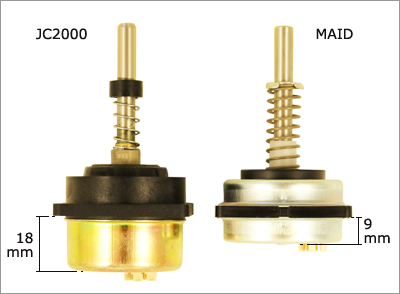
The Curtis appears to use the same joystick as Penny and Giles... ( see pic below )...could you please see if it has any identifying marks so that I can confirm this.
Image

http://www.cw-industrialgroup.com/getat ... 0_jun07(EN)

Cheers Woody
User avatar
woodygb
 
Posts: 7128
Joined: 12 Mar 2011, 18:45
Location: Bedford UK

Re: Arduino controlled wheelchair

Postby gcebiker » 08 Oct 2015, 09:08

Its reassembled and in the shed..which is outside in the rain (no internal access)

Ill take it appart again tomorrow. But from your pictures it has the top of the one on the right and the bottom of the one on the left....
User avatar
gcebiker
 
Posts: 879
Joined: 11 Jul 2015, 14:20
Location: Gold Coast, Queensland, Australia.

Re: Arduino controlled wheelchair

Postby gcebiker » 08 Oct 2015, 11:42

Just opened it up again, its a JC2000.
User avatar
gcebiker
 
Posts: 879
Joined: 11 Jul 2015, 14:20
Location: Gold Coast, Queensland, Australia.

Re: Arduino controlled wheelchair

Postby woodygb » 08 Oct 2015, 12:10

Thank you very much ... my current B.T or R/C interface should plug straight in ...assuming that the joystick voltage swings etc are the same.

IF you get time I'd very much like a voltage read out of the pins ...

NOTE if you measure voltages at the board , that the connecting ribbon may have the plugs crimped to opposite sides thus transposing the numbering system.

The Joystick pin 1 is board pin 7 which is 5v
2 is 8 L/R OUTPUT 1
3 is 5 GND 0V
4 is 6 FORE/AFT OUTPUT 1
5 is 3 FORE/AFT OUTPUT 2
6 is 4 Vs/2 2.5v
7 is 1 L/R OUTPUT 2
and 8 is 2 Not connected
User avatar
woodygb
 
Posts: 7128
Joined: 12 Mar 2011, 18:45
Location: Bedford UK

Re: Arduino controlled wheelchair

Postby gcebiker » 08 Oct 2015, 12:21

Im not sure ill be able to measure the voltage swings.

The way it was wired up this afternoon, it was ok just sitting on the bench talking to the Laptop but when i moved the joystick i got motor errors (as they were not plugged in)

I did not take the board out and im not keen to either in case i damage the LCD / Cable, it has not happened many times but enough that i now dont move stuff unless i have to.

Ill open it back up and if i can get some readings ill post them here
Could you stick a link up for anyone following this tangent ..in case they are interested in your Controllers ?

Cheers
Tony
Gold Coast, Australia
User avatar
gcebiker
 
Posts: 879
Joined: 11 Jul 2015, 14:20
Location: Gold Coast, Queensland, Australia.

Re: Arduino controlled wheelchair

Postby woodygb » 08 Oct 2015, 23:03

I'm not sure ..I'd need to check ...but I think the ERROR messages have no effect on the actual joystick voltage being produced...it's just not acted on.
You should have been able to program the controller without connecting the brake wires or motors just ignore the ERROR messages .

Blue Tooth remote control link....R/C is very similar.
viewtopic.php?f=2&t=4479
User avatar
woodygb
 
Posts: 7128
Joined: 12 Mar 2011, 18:45
Location: Bedford UK

Re: Arduino controlled wheelchair

Postby gcebiker » 14 Oct 2015, 13:55

Work in progress,

Posting here if anyone else is working on detecting/modifying the serial data between a Dynamic Shark wheelchair controller and the Dynamic Shark Motor driver.

In prep for vision assist modules, stop assist to prevent damage to house walls / aid spastisity difficulties.

The people i am trying to help are not intellectually injured, its external control / communication , trapping them inside their bodies.

Hoping to further the work of Gizmosmith

This is my first go at writing original Arduino Code (rather than tweaking something else i have found)
this is also posted over on the Arduino forums.


Combining tested packets, getting ready to do
Read state (on/off)
Read On/off button
then write appropriate packet or stop serial write , ie digitalWrite (txPin, Low);

Code: Select all
// This sketch is to emulate the packet of data that the Shark Joystick sends
/******************************************************************************
    * Author: Tony Matthews ammatthews at gmail dot com
    * License: FreeBSD
    ******************************************************************************/
/******************************************************************************
Copyright (c) 2015, Tony Matthews
All rights reserved.

Redistribution and use in source and binary forms, with or without
modification, are permitted provided that the following conditions are met:

1. Redistributions of source code must retain the above copyright notice, this
   list of conditions and the following disclaimer.
2. Redistributions in binary form must reproduce the above copyright notice,
   this list of conditions and the following disclaimer in the documentation
   and/or other materials provided with the distribution.

THIS SOFTWARE IS PROVIDED BY THE COPYRIGHT HOLDERS AND CONTRIBUTORS "AS IS" AND
ANY EXPRESS OR IMPLIED WARRANTIES, INCLUDING, BUT NOT LIMITED TO, THE IMPLIED
WARRANTIES OF MERCHANTABILITY AND FITNESS FOR A PARTICULAR PURPOSE ARE
DISCLAIMED. IN NO EVENT SHALL THE COPYRIGHT OWNER OR CONTRIBUTORS BE LIABLE FOR
ANY DIRECT, INDIRECT, INCIDENTAL, SPECIAL, EXEMPLARY, OR CONSEQUENTIAL DAMAGES
(INCLUDING, BUT NOT LIMITED TO, PROCUREMENT OF SUBSTITUTE GOODS OR SERVICES;
LOSS OF USE, DATA, OR PROFITS; OR BUSINESS INTERRUPTION) HOWEVER CAUSED AND
ON ANY THEORY OF LIABILITY, WHETHER IN CONTRACT, STRICT LIABILITY, OR TORT
(INCLUDING NEGLIGENCE OR OTHERWISE) ARISING IN ANY WAY OUT OF THE USE OF THIS
SOFTWARE, EVEN IF ADVISED OF THE POSSIBILITY OF SUCH DAMAGE.

The views and conclusions contained in the software and documentation are those
of the authors and should not be interpreted as representing official policies,
either expressed or implied, of the FreeBSD Project.

*******************************************************************************/

// This code is incomplete and still under revision.
// Its also got junk that may not be needed,
// Early testing phases.
// Successful output of Data packet for Shark Wheelchair controller.
// Not tested on chair, just on the Logic Analyzer.
// Pulse at one second for testing, chair sends pulse every 17ish microseconds

#include <SoftwareSerial.h>

#define rxPin 10      // Digital Pin10 for Receive from controller.
// this will have to be changed for the GCDuiNode as it uses this pin to communicate with the RF24

#define txPin 11      // Digital Pin11 Transmit from Shark Joystick to Controller.

// int sharkDataInt [10];    //Declare size of data packet sent from Shark Joystick
int joyStartByte;    //  was/is to setup/call function from new "void sharkJoyInt" .h file yet to be written.

// Names for Pins and what they are connected to
const int yPot = A0;    // Y Pot input value
const int xPot = A1;    // X Pot input value

// not used yet but will be one day...not that i ever dial my chair down...what's the point of going slow :P
int maxPot = A2;      // Max speed dial pot


// Names for analogRead values of Analog Pots
int yPotVal;
int xPotVal;
int maxSpeedVal;

// Names for Mapped analogRead Values of Pots
int yPotValMapped;
int xPotValMapped;


// Size of data packet, tho the packets are not constrained to this size.
// This size for this packet but probably not for others.
unsigned char data[11];
unsigned long timer = 0;

// set up a new serial port
SoftwareSerial sharkSerial (rxPin, txPin, true);    // TRUE sets this to invert software serial output.


void setup() {
  // put your setup code here, to run once:

// define pin modes for tx, rx:
  pinMode(rxPin, INPUT);
  pinMode(txPin, OUTPUT);

  // set the data rate for the SoftwareSerial port
  sharkSerial.begin(38400);
}

void loop() {
  // Need to add
  // Check for state, is Shark Joy On or OFF ??
  // If OFF and button press "on" - run function 'sharkStartUp'
  // If ON and button press "off" - stop serial output
  // If ON and no button "on/off" - run function  'sharkOnMode'


}

void sharkStartup (){ //startup set of iverted serial data
// data set is incomplete, i will need to detect joy xy ..i think
// work in progress

  { 
    yPotVal = analogRead(yPot);
    xPotVal = analogRead(xPot);
    yPotValMapped = map(yPotVal, 0, 1023, 128, 255); // Map min/max pot values to match min/max original Shark joystick values.
    xPotValMapped = map(xPotVal, 0, 1012, 128, 255); // Map X values
  }


  {
    //build serial packet
    data[0] = (0x74);   // Joystik packets start with this " ' " not accepted had to use hex)
    data[1] = 130;     // Joystick Y value
    data[2] = 133;     // Joystick X value
    data[3] = 130;      // Max speed setting via turtle/hare buttons on joystick
    data[4] = 128;      // Speed Fine Tune ?
    data[5] = 136;     // default horn off, horn on value is 130
    data[6] = 205;     // joystick On Value ?
    data[7] = 160;     // chair mode/ drive 128, tilt/aux output 129
    data[8] = 128;      //?
    data[9] = 141;     // ?
    data[10] = 15;       // all packets end with this identifier

  }
  for (unsigned char i = 0; i < 11; i++)
    sharkSerial.write(data[i]);


  //  delay(17);    //Delay to next packet being sent.
}
 void sharkOnMode (){
  {
    yPotVal = analogRead(yPot);
    xPotVal = analogRead(xPot);
    yPotValMapped = map(yPotVal, 0, 1023, 128, 255); // Map min/max pot values to match min/max original Shark joystick values.
    xPotValMapped = map(xPotVal, 0, 1012, 128, 255); // Map X values
  }
  {
    // " ' " build serial packet
    data[0] = (0x60);   // Joystik packets start with this " ' " not accepted had to use hex
    data[1] = yPotValMapped; // Joystick Y value
    data[2] = xPotValMapped; // Joystick X value
    data[3] = 255;      // Max speed setting via turtle/hare buttons on joystick
    data[4] = 192;      // Speed Fine Tune ?
    data[5] = 128;     // default horn off, horn on value is 130
    data[6] = 140;     // joystick On Value ?
    data[7] = 128;     // chair mode/ drive 128, tilt/aux output 129
    data[8] = 212;     // some other XY modifier..maybe acceleration/de settings
    data[9] = 15;       // all packets end with this identifier

    for (unsigned char i = 0; i < 10; i++)
             sharkSerial.write(data[i]);
    }
   
  delay(1) ; // 1.718ms till next "a" packet
  {
   
    // " a " build serial packet
    data[0] = (0x61);   //
    data[1] = 146;     //
    data[2] = 128;     //
    data[3] = 192;      // 
    data[4] = 128;      //
    data[5] = 128;     //
    data[6] = 128;     //
    data[7] = 128;     //
    data[8] = 204;
 
    for (unsigned char i = 0; i < 9; i++)
             sharkSerial.write(data[i]);
    }
     delay(1);
     
     sharkSerial.write(0x0f);
     
   
  delay(17);    //Delay next packet 17ms input from Shark joystick

}


User avatar
gcebiker
 
Posts: 879
Joined: 11 Jul 2015, 14:20
Location: Gold Coast, Queensland, Australia.

Re: Arduino controlled wheelchair

Postby gcebiker » 18 Oct 2015, 08:05

No response from joystick as yet.
Success...it turns "on" (starts writing the inverted serial data)
Success it turns "off" (stops writing)

Data Stream on Saleae Logic4 looks ok...but the RX is high when it needs to start low, go high when powered and stay high till turned off.
..still trying to find out how to do it,

Ive tried rx on pin 10 - opposite happens, starts low and wont let itself go high..ever.
(currently runs RX on Hardware UART pin0)

Ive go to be getting close for sure ?, its my first time coding ...please be gentle if i have missed something obvious...or even not so obvious.
Any constructive feed back is much appreciated.
Code: Select all
[code]


// This sketch is to emulate the packet of data that the Shark Joystick sends
/******************************************************************************
    * Author: Tony Matthews ammatthews at gmail dot com
    * License: FreeBSD
    ******************************************************************************/
/******************************************************************************
Copyright (c) 2015, Tony Matthews
All rights reserved.

Redistribution and use in source and binary forms, with or without
modification, are permitted provided that the following conditions are met:

1. Redistributions of source code must retain the above copyright notice, this
   list of conditions and the following disclaimer.
2. Redistributions in binary form must reproduce the above copyright notice,
   this list of conditions and the following disclaimer in the documentation
   and/or other materials provided with the distribution.

THIS SOFTWARE IS PROVIDED BY THE COPYRIGHT HOLDERS AND CONTRIBUTORS "AS IS" AND
ANY EXPRESS OR IMPLIED WARRANTIES, INCLUDING, BUT NOT LIMITED TO, THE IMPLIED
WARRANTIES OF MERCHANTABILITY AND FITNESS FOR A PARTICULAR PURPOSE ARE
DISCLAIMED. IN NO EVENT SHALL THE COPYRIGHT OWNER OR CONTRIBUTORS BE LIABLE FOR
ANY DIRECT, INDIRECT, INCIDENTAL, SPECIAL, EXEMPLARY, OR CONSEQUENTIAL DAMAGES
(INCLUDING, BUT NOT LIMITED TO, PROCUREMENT OF SUBSTITUTE GOODS OR SERVICES;
LOSS OF USE, DATA, OR PROFITS; OR BUSINESS INTERRUPTION) HOWEVER CAUSED AND
ON ANY THEORY OF LIABILITY, WHETHER IN CONTRACT, STRICT LIABILITY, OR TORT
(INCLUDING NEGLIGENCE OR OTHERWISE) ARISING IN ANY WAY OUT OF THE USE OF THIS
SOFTWARE, EVEN IF ADVISED OF THE POSSIBILITY OF SUCH DAMAGE.

The views and conclusions contained in the software and documentation are those
of the authors and should not be interpreted as representing official policies,
either expressed or implied, of the FreeBSD Project.

*******************************************************************************/

// This code is incomplete and still under revision.
// Its also got junk that may not be needed,
// Early testing phases.


#include <SoftwareSerial.h>

// Names for Pins and what they are connected to
const int rxPin = 0;      // Digital Pin 0 for Receive from Motor controller.
// getting ready to use GCDuiNode with the RF24 or Wii Nunchuck (currently hard wired)

const int txPin = 1;          // Digital Pin 1 Transmit from Shark Joystick to Motor Controller.
const int onOffPin = 2;        // Digital Pin 2 is the software on/off button
boolean onOffstate = LOW;      //name holder for what the state is at the moment.

const int yPot = A0;    // Y Pot input value
const int xPot = A1;    // X Pot input value

const int maxPot = A2;      // Max speed dial pot


// Names for analogRead values of Analog Pots
int yPotVal;
int xPotVal;
int maxSpeedVal;

// Names for Mapped analogRead Values of Pots
int yPotValMapped;
int xPotValMapped;


// Size of data packet, tho the packets are not constrained to this size.
// This size for this packet but probably not for others.
unsigned char data[11];
unsigned long timer = 0;

// set up a new serial port
// digitalWrite(rxPin, LOW); //attempting to get RX to start low before going high when 'on'state
SoftwareSerial sharkSerial (rxPin, txPin, true);    // TRUE sets this to invert software serial output.
// i may need to comment out some lines of the .file to let the RX start off low.


void setup() {
  // define pin modes for tx, rx:
  // not sure its needed, seems to work when commented out
  pinMode(rxPin, INPUT);      // software serial inverted recieve pin
  pinMode(txPin, OUTPUT);     // softwaer serial inverted transmit pin
  pinMode(13, OUTPUT);        // Arduino led to monitor on or off state.
  pinMode(onOffPin, INPUT_PULLUP);    // Software on/off button, turn on internal pull up resistors.

  //i think .end is in right place, may need to go higher in script ?
  Serial.end(); // allow software serial to use Hardware UART

  // start & set the data rate for the SoftwareSerial port
  sharkSerial.begin(38400);
}

void loop() {
  // Starts in Off state from physical power on.
  // Check state, if "on" , "turn off".
  if (digitalRead(onOffPin) == LOW && onOffstate == HIGH)
  {
    onOffstate = !onOffstate;    //toggles onOffstate from HIGH to LOW (if it was HIGH when the on/off button is pressed)
    digitalWrite(txPin, LOW);    // hold txPin low
    digitalWrite(13, onOffstate);    // Turn off the LED on arduino as indication of state
    delay (300);       //debounce switch delay
  }


  // check state, if on/off button is pressed, change state to on and run start up sequence.
  else if (digitalRead(onOffPin) == LOW && onOffstate == LOW)
  {
    onOffstate = !onOffstate;     // toggle state to HIGH if in'off mode' and on/off button is pressed
    digitalWrite(13, onOffstate); // turn on LED pin to get visual indication of on/off state
    sharkStartup();              // call function sharkStartup()
    delay(11);    // delay 11ms before calling sharkOnMode() per next if statement.
  }


  if (onOffstate == HIGH)
  {
    digitalWrite(13, onOffstate);    //Keep arduino LED 'on' as indication of mode arduino is in
    sharkOnMode();                   // Call sharkOnMode() to write joystick data to inverted serial bus
  }


}

// Dynamic Shark start up sequence, inverted serial data.

void sharkStartup () {
  // data set is incomplete
  // work in progress
  // Power On sequence, High for .293seconds, low for 10.23ms, write 't' packet, low 2.3ms

  {
    digitalWrite(txPin, HIGH);
    delay(293);
    digitalWrite(txPin, LOW);
    delay(10);
  }

  {
    //build serial packet
    data[0] = (0x74);   // start identifier...handshake ? " t "
    data[1] = 130;      // Joystick Y value
    data[2] = 133;      // Joystick X value
    data[3] = 130;      // Max speed setting via turtle/hare buttons on joystick
    data[4] = 128;      // Speed Fine Tune ?
    data[5] = 136;      // default horn off, horn on value is 130
    data[6] = 205;      // joystick On Value ?
    data[7] = 160;      // chair mode/ drive 128, tilt/aux output 129
    data[8] = 128;      //?
    data[9] = 141;      // ?
    data[10] = 15;      // all packets end with this identifier

    for (unsigned char i = 0; i < 11; i++)
      sharkSerial.write(data[i]);
  }
  delay(2);       // delay before next handshake? packet

  // build next handshake packet
  {
    sharkSerial.write(0x05);
    sharkSerial.write(0x80);
    sharkSerial.write(0xFA);
  }
  delay(1);     // delay before close identifier "15"
  sharkSerial.write(0x0F);

  delay(11);    //delay 12ms before sending single sharkOnMode() packet.
  sharkOnMode(); // write one "0x60" packet and one "a" packet

  // delay(11);    //delay 11.71ms before sending single sharkThridpacket()
  // delay not needed as previous sharkOnMode() has delay at end already.
  sharkThirdpacket ();     // write one third packet

}


void sharkThirdpacket () {
  //this third packet of data is very similar to the sharkOnMode but
  //"0x60" section, 1.6ms pause low, "a" section, .6ms low, "26,133,167,185"

  {
    // " ' " build serial packet
    data[0] = (0x60);   // Joystik packets start with this
    data[1] = yPotValMapped; // Joystick Y value
    data[2] = xPotValMapped; // Joystick X value
    data[3] = 255;      // Max speed setting via turtle/hare buttons on joystick
    data[4] = 192;      // Speed Fine Tune ?
    data[5] = 128;     // default horn off, horn on value is 130
    data[6] = 140;     // joystick On Value ?
    data[7] = 128;     // chair mode/ drive 128, tilt/aux output 129
    data[8] = 212;     // some other XY modifier..maybe acceleration/de settings
    data[9] = 15;       // all packets end with this identifier

    for (unsigned char i = 0; i < 10; i++)
      sharkSerial.write(data[i]);
  }
  delay(1) ; // 1.718ms till next "a" packet
  {
    // " a " build serial packet
    data[0] = (0x61);   //
    data[1] = 146;     //
    data[2] = 128;     //
    data[3] = 192;      //
    data[4] = 128;      //
    data[5] = 128;     //
    data[6] = 128;     //
    data[7] = 128;     //
    data[8] = 204;

    for (unsigned char i = 0; i < 9; i++)
      sharkSerial.write(data[i]);
  }
  delay(1);
  {
    // build "26,133,167,185" packet
    data[0] = 26;
    data[1] = 133;
    data[2] = 167;
    data[3] = 185;

    for (unsigned char i = 0; i < 4; i++)
      sharkSerial.write(data[i]);
  }
  delay(1);
  sharkSerial.write(0x0f);

}


// function to write: emulated, inverted, serial data.
void sharkOnMode () {
  {
    yPotVal = analogRead(yPot);
    xPotVal = analogRead(xPot);
    yPotValMapped = map(yPotVal, 0, 1023, 128, 255); // Map min/max pot values to match min/max original Shark joystick values.
    xPotValMapped = map(xPotVal, 0, 1012, 128, 255); // Map X values
  }
  {

    // " ' " build serial packet
    data[0] = (0x60);   // Joystik packets start with this
    data[1] = yPotValMapped; // Joystick Y value
    data[2] = xPotValMapped; // Joystick X value
    data[3] = 255;      // Max speed setting via turtle/hare buttons on joystick
    data[4] = 192;      // Speed Fine Tune ?
    data[5] = 128;     // default horn off, horn on value is 130
    data[6] = 140;     // joystick On Value ?
    data[7] = 128;     // chair mode/ drive 128, tilt/aux output 129
    data[8] = 212;     // some other XY modifier..maybe acceleration/de settings
    data[9] = 15;       // all packets end with this identifier

    for (unsigned char i = 0; i < 10; i++)
      sharkSerial.write(data[i]);
  }

  delay(1) ; // 1.718ms till next "a" packet
  {

    // " a " build serial packet
    data[0] = (0x61);   //
    data[1] = 146;     //
    data[2] = 128;     //
    data[3] = 192;      //
    data[4] = 128;      //
    data[5] = 128;     //
    data[6] = 128;     //
    data[7] = 128;     //
    data[8] = 204;

    for (unsigned char i = 0; i < 9; i++)
      sharkSerial.write(data[i]);
  }
  delay(1);

  sharkSerial.write(0x0f);


  delay(11);    //Delay next packet 17ms input from Shark joystick

}


[/code]
User avatar
gcebiker
 
Posts: 879
Joined: 11 Jul 2015, 14:20
Location: Gold Coast, Queensland, Australia.

Re: Arduino controlled wheelchair

Postby woodygb » 18 Oct 2015, 09:01

Could you not read the RX signal output with a pin and then write the required inverted signal via another?
User avatar
woodygb
 
Posts: 7128
Joined: 12 Mar 2011, 18:45
Location: Bedford UK

Re: Arduino controlled wheelchair

Postby gcebiker » 18 Oct 2015, 09:34

At present its on the UART pins, RX/TX ...started off today on pins 10/11
RX it stays high, pin10 it stayed low.

There is a work around involving commenting out two lines of the .h file, which pertain to the settings of the RX line (basically leaving the TX inverted and RX non inverted...i think...)

I dont have a MAX232 chip but if i do get one that might be the missing link (rather than using software inverted).

Also in one of the packets of data i had to write it line by line instead of (unsigned char i ...) which is how i do the other packets, got stuck in a loop so i changed it to the
line by line.
serial.Write(val);
serial.Write(val);

Ill try switching back to the unsigned char , method and pin 10/11 as at least i was getting a response from the base...incorrect but something :)
User avatar
gcebiker
 
Posts: 879
Joined: 11 Jul 2015, 14:20
Location: Gold Coast, Queensland, Australia.

Re: Arduino controlled wheelchair

Postby gcebiker » 18 Oct 2015, 09:52

motor controller does not seem to send anything back to the joystick...tho i have not tried unplugging a brake line to find out if it would do.
User avatar
gcebiker
 
Posts: 879
Joined: 11 Jul 2015, 14:20
Location: Gold Coast, Queensland, Australia.

Re: Arduino controlled wheelchair

Postby gcebiker » 18 Oct 2015, 10:27

Yeah found some coding/timing errors (code putting timing out), its slow going.
User avatar
gcebiker
 
Posts: 879
Joined: 11 Jul 2015, 14:20
Location: Gold Coast, Queensland, Australia.

Re: Arduino controlled wheelchair

Postby woodygb » 18 Oct 2015, 11:25

You could use a 74HC14A Hex inverter instead of the MAX232 chip.
User avatar
woodygb
 
Posts: 7128
Joined: 12 Mar 2011, 18:45
Location: Bedford UK

Re: Arduino controlled wheelchair

Postby gcebiker » 18 Oct 2015, 11:47

Cleaned up some tiny bits of code, timing is better.
Its odd, i thought maybe it (the arduino) needed more power, so i hooked up a plug pack to the development board...all it ouput was garbage...or was it.

I tested a few times, lipo battery, usb power via wall, usb power via computer...

A pin on the Saleae Logic4 or my wiring must have been loose or Ive had too long today staring at a computer screen...idk

Upshot....the Joystick when its 'off' is still sending a stream of 255,255,255,255, ...must be the "i am turned off do nothing" signal.

My best guess
i had taped the bare wire end sockets with sticky tape, which fell off but left a bit of sticky behind and i've now covered with heatshrink and gotten the tape glue off....i bet it was blocking the signal all the time. :oops:

So the sketch below is working for now, i will look at taking the factory joystick off from Motor controller and do tests without it being wired in parallel.
By 'working' i mean getting correct reads on the TX line with Logic4, no result from chair as yet.
Code: Select all

// This sketch is to emulate the packet of data that the Shark Joystick sends
/******************************************************************************
    * Author: Tony Matthews ammatthews at gmail dot com
    * License: FreeBSD
    ******************************************************************************/
/******************************************************************************
Copyright (c) 2015, Tony Matthews
All rights reserved.

Redistribution and use in source and binary forms, with or without
modification, are permitted provided that the following conditions are met:

1. Redistributions of source code must retain the above copyright notice, this
   list of conditions and the following disclaimer.
2. Redistributions in binary form must reproduce the above copyright notice,
   this list of conditions and the following disclaimer in the documentation
   and/or other materials provided with the distribution.

THIS SOFTWARE IS PROVIDED BY THE COPYRIGHT HOLDERS AND CONTRIBUTORS "AS IS" AND
ANY EXPRESS OR IMPLIED WARRANTIES, INCLUDING, BUT NOT LIMITED TO, THE IMPLIED
WARRANTIES OF MERCHANTABILITY AND FITNESS FOR A PARTICULAR PURPOSE ARE
DISCLAIMED. IN NO EVENT SHALL THE COPYRIGHT OWNER OR CONTRIBUTORS BE LIABLE FOR
ANY DIRECT, INDIRECT, INCIDENTAL, SPECIAL, EXEMPLARY, OR CONSEQUENTIAL DAMAGES
(INCLUDING, BUT NOT LIMITED TO, PROCUREMENT OF SUBSTITUTE GOODS OR SERVICES;
LOSS OF USE, DATA, OR PROFITS; OR BUSINESS INTERRUPTION) HOWEVER CAUSED AND
ON ANY THEORY OF LIABILITY, WHETHER IN CONTRACT, STRICT LIABILITY, OR TORT
(INCLUDING NEGLIGENCE OR OTHERWISE) ARISING IN ANY WAY OUT OF THE USE OF THIS
SOFTWARE, EVEN IF ADVISED OF THE POSSIBILITY OF SUCH DAMAGE.

The views and conclusions contained in the software and documentation are those
of the authors and should not be interpreted as representing official policies,
either expressed or implied, of the FreeBSD Project.

*******************************************************************************/

// This code is incomplete and still under revision.
// Its also got junk that may not be needed,
// Early testing phases.


#include <SoftwareSerial.h>

// Names for Pins and what they are connected to
const int rxPin = 9;      // Digital Pin 0 for Receive from Motor controller.
// getting ready to use GCDuiNode with the RF24 or Wii Nunchuck (currently hard wired)

const int txPin = 12;          // Digital Pin 1 Transmit from Shark Joystick to Motor Controller.
const int onOffPin = 2;        // Digital Pin 2 is the software on/off button
boolean onOffstate = LOW;      //name holder for what the state is at the moment.

const int yPot = A0;    // Y Pot input value
const int xPot = A1;    // X Pot input value

const int maxPot = A2;      // Max speed dial pot


// Names for analogRead values of Analog Pots
int yPotVal;
int xPotVal;


// Names for Mapped analogRead Values of Pots
int yPotValMapped;
int xPotValMapped;


// Size of data packet, tho the packets are not constrained to this size.
// This size for this packet but probably not for others.
unsigned char data[12];
unsigned long timer = 0;

// set up a new port
SoftwareSerial sharkSerial (rxPin, txPin, true);    // TRUE sets this to invert software serial output.
// i may need to comment out some lines of the .file to let the RX start off low.


void setup() {
  // define pin modes for tx, rx:
  // not sure its needed, seems to work when commented out
  pinMode(rxPin, INPUT);      // software serial inverted recieve pin
  pinMode(txPin, OUTPUT);     // softwaer serial inverted transmit pin
  pinMode(13, OUTPUT);        // Arduino led to monitor on or off state.
  pinMode(onOffPin, INPUT_PULLUP);    // Software on/off button, turn on internal pull up resistors.

 
  // start & set the data rate for the SoftwareSerial port
  sharkSerial.begin(38400);
}

void loop() {
  // Starts in Off state from physical power on.
  // Check state, if "on" , "turn off".
  if (digitalRead(onOffPin) == LOW && onOffstate == HIGH)
  {
    onOffstate = !onOffstate;    //toggles onOffstate from HIGH to LOW (if it was HIGH when the on/off button is pressed)
    digitalWrite(txPin, LOW);    // hold txPin low
    digitalWrite(13, onOffstate);    // Turn off the LED on arduino as indication of state
    delay (300);       //debounce switch delay
  }


  // check state, if on/off button is pressed, change state to on and run start up sequence.
  else if (digitalRead(onOffPin) == LOW && onOffstate == LOW)
  {
    onOffstate = !onOffstate;     // toggle state to HIGH if in'off mode' and on/off button is pressed
    digitalWrite(13, onOffstate); // turn on LED pin to get visual indication of on/off state
    sharkStartup();              // call function sharkStartup()
    delay(11);    // delay 11ms before calling sharkOnMode() per next if statement.
  }


  if (onOffstate == HIGH)
  {
    digitalWrite(13, onOffstate);    //Keep arduino LED 'on' as indication of mode arduino is in
    sharkOnMode();                   // Call sharkOnMode() to write joystick data to inverted serial bus
  }


}

// Dynamic Shark start up sequence, inverted serial data.

void sharkStartup () {
  // data set is incomplete
  // work in progress
  // Power On sequence, High for .293seconds, low for 10.23ms, write 't' packet, low 2.3ms

  {
    digitalWrite(txPin, HIGH);
    delay(293);
    digitalWrite(txPin, LOW);
    delay(10);
  }

  {
    //build serial packet
    data[0] = (0x74);   // start identifier...handshake ? " t "
    data[1] = 130;      // Joystick Y value
    data[2] = 133;      // Joystick X value
    data[3] = 130;      // Max speed setting via turtle/hare buttons on joystick
    data[4] = 128;      // Speed Fine Tune ?
    data[5] = 136;      // default horn off, horn on value is 130
    data[6] = 205;      // joystick On Value ?
    data[7] = 160;      // chair mode/ drive 128, tilt/aux output 129
    data[8] = 128;      //?
    data[9] = 141;      // ?
    data[10] = 15;      // all packets end with this identifier

    for (unsigned char i = 0; i < 11; i++)
      sharkSerial.write(data[i]);
  }
  delay(2);       // delay before next handshake? packet

  // build next handshake packet
  {
    data[0] = 5;       //
    data[1] = 128;      //
    data[2] = 250;      //
 for (unsigned char i = 0; i < 3; i++)
      sharkSerial.write(data[i]);

    }
  delay(1);     // delay before close identifier "15"
  sharkSerial.write(0x0F);

  delay(11);    //delay 12ms before sending single sharkOnMode() packet.
  sharkOnMode(); // write one "0x60" packet and one "a" packet

  // delay(11);    //delay 11.71ms before sending single sharkThridpacket()
  // delay not needed as previous sharkOnMode() has delay at end already.
  sharkThirdpacket ();     // write one third packet

}


void sharkThirdpacket () {
  //this third packet of data is very similar to the sharkOnMode but
  //"0x60" section, 1.6ms pause low, "a" section, .6ms low, "26,133,167,185"

  {
    // " ' " build serial packet
    data[0] = (0x60);   // Joystik packets start with this
    data[1] = yPotValMapped; // Joystick Y value
    data[2] = xPotValMapped; // Joystick X value
    data[3] = 255;      // Max speed setting via turtle/hare buttons on joystick
    data[4] = 205;      // Speed Fine Tune ?
    data[5] = 128;     // default horn off, horn on value is 130
    data[6] = 140;     // joystick On Value ?
    data[7] = 128;     // chair mode/ drive 128, tilt/aux output 129
    data[8] = 200;     // some other XY modifier..maybe acceleration/de settings
    data[9] = 15;       // all packets end with this identifier

    for (unsigned char i = 0; i < 10; i++)
      sharkSerial.write(data[i]);
  }
  delay(1) ; // 1.718ms till next "a" packet
  {
    // " a " build serial packet
    data[0] = (0x61);   //
    data[1] = 128;     //
    data[2] = 192;     //
    data[3] = 192;      //
    data[4] = 128;      //
    data[5] = 128;     //
    data[6] = 128;     //
    data[7] = 128;     //
    data[8] = 158;    //

    for (unsigned char i = 0; i < 9; i++)
      sharkSerial.write(data[i]);
  }
  delay(1);
  {
    // build "26,133,167,185" packet
    data[0] = 26;
    data[1] = 133;
    data[2] = 167;
    data[3] = 185;

    for (unsigned char i = 0; i < 4; i++)
      sharkSerial.write(data[i]);
  }
  delay(1);
  sharkSerial.write(0x0f);

}


// function to write: emulated, inverted, serial data.
void sharkOnMode () {
  {
    yPotVal = analogRead(yPot);
    xPotVal = analogRead(xPot);
    yPotValMapped = map(yPotVal, 0, 1023, 128, 255); // Map min/max pot values to match min/max original Shark joystick values.
    xPotValMapped = map(xPotVal, 0, 1012, 128, 255); // Map X values
  }
  {

    // " ' " build serial packet
    data[0] = (0x60);   // Joystik packets start with this
    data[1] = yPotValMapped; // Joystick Y value
    data[2] = xPotValMapped; // Joystick X value
    data[3] = 255;      // Max speed setting via turtle/hare buttons on joystick
    data[4] = 192;      // Speed Fine Tune ?
    data[5] = 128;     // default horn off, horn on value is 130
    data[6] = 140;     // joystick On Value ?
    data[7] = 128;     // chair mode/ drive 128, tilt/aux output 129
    data[8] = 191;     // some other XY modifier..maybe acceleration/de settings
    data[9] = 15;       // all packets end with this identifier

    for (unsigned char i = 0; i < 10; i++)
      sharkSerial.write(data[i]);
  }

  delay(1) ; // 1.718ms till next "a" packet
  {

    // " a " build serial packet
    data[0] = (0x61);   //
    data[1] = 128;     //
    data[2] = 192;     //
    data[3] = 192;      //
    data[4] = 128;      //
    data[5] = 128;     //
    data[6] = 128;     //
    data[7] = 128;     //
    data[8] = 158;

    for (unsigned char i = 0; i < 9; i++)
      sharkSerial.write(data[i]);
  }
  delay(1);

  sharkSerial.write(0x0f);


  delay(11);    //Delay next packet 17ms input from Shark joystick

}


User avatar
gcebiker
 
Posts: 879
Joined: 11 Jul 2015, 14:20
Location: Gold Coast, Queensland, Australia.

PreviousNext

Return to Everything Powerchair

Who is online

Users browsing this forum: No registered users and 571 guests


  eXTReMe Tracker