Yes...
Nick ..nlt99 ... has recently made a guide using my instructions,.
viewtopic.php?f=2&t=5523
PINNED - Info on PROGRAMMING PGDT and others
Re: DIY PGDT interface for OEM PROGRAMMING
 by woodygb » 27 Nov 2015, 13:25
An expert is a person who has made all the mistakes that can be made in a very narrow field.
Niels Bohr
Niels Bohr
-

woodygb - Posts: 7128
- Joined: 12 Mar 2011, 18:45
- Location: Bedford UK
Re: DIY PGDT interface for OEM PROGRAMMING
by MJCHAMP » 30 Dec 2015, 22:05
I am a quadriplegic living in the US and have an Invacare TDX – SP powerchair.
I want to change the default settings for the controller.
I found this cable on eBay.
http://goo.gl/uG6CnN
If I have someone change the plug according to this diagram.
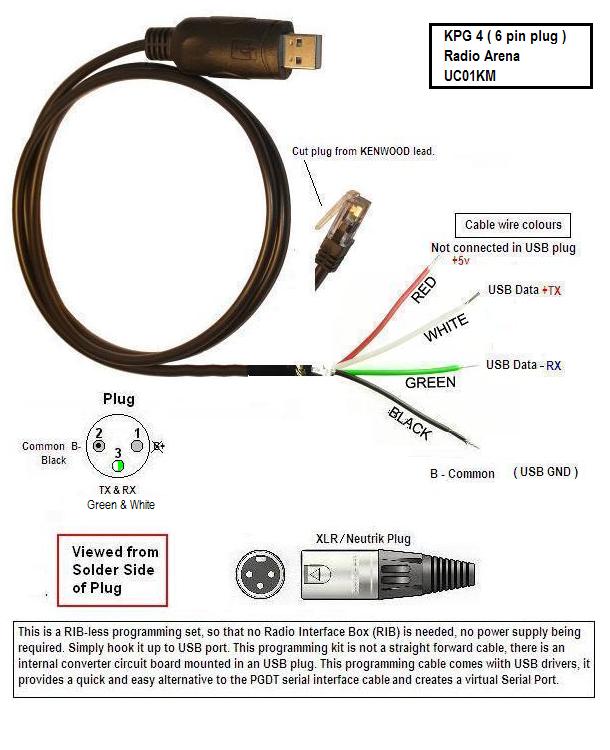
And download the software onto my Windows 10 PC
Re: PGDT interface update
by woodygb » 16 Jun 2012, 13:23
Prolific PL2303 ver 3.2.0.0 driver zip
http://sdrv.ms/LcQ1B7
Is this all I need?
I want to change the default settings for the controller.
I found this cable on eBay.
http://goo.gl/uG6CnN
If I have someone change the plug according to this diagram.
And download the software onto my Windows 10 PC
Re: PGDT interface update
by woodygb » 16 Jun 2012, 13:23
Prolific PL2303 ver 3.2.0.0 driver zip
http://sdrv.ms/LcQ1B7
Is this all I need?
- MJCHAMP
- Posts: 2
- Joined: 29 Dec 2015, 04:13
Re: DIY PGDT interface for OEM PROGRAMMING
by Burgerman » 30 Dec 2015, 22:35
Yes, unless its R-net.
Not sure about the cable being correct but woodygb will be along soon!
As long as its PGDT, or you will need different software.
Not sure about the cable being correct but woodygb will be along soon!
As long as its PGDT, or you will need different software.
-

Burgerman - Site Admin
- Posts: 71102
- Joined: 27 May 2008, 21:24
- Location: United Kingdom
Re: DIY PGDT interface for OEM PROGRAMMING
by woodygb » 30 Dec 2015, 22:52
I'd now recommend a lead with the FTDI chip set.
The build for the FTDI lead is described by nick in this guide ...viewtopic.php?f=2&t=5523...the plug is of course different for a wheelchair.
viewtopic.php?f=1&t=5488
The build for the FTDI lead is described by nick in this guide ...viewtopic.php?f=2&t=5523...the plug is of course different for a wheelchair.
viewtopic.php?f=1&t=5488
An expert is a person who has made all the mistakes that can be made in a very narrow field.
Niels Bohr
Niels Bohr
-
woodygb - Posts: 7128
- Joined: 12 Mar 2011, 18:45
- Location: Bedford UK
Re: DIY PGDT interface for OEM PROGRAMMING
by bluegizmo83 » 28 Jan 2016, 22:05
Where can I find the software I need to program a PG Drives chair? I have the Kenwood cable, now I just need the software...
- bluegizmo83
- Posts: 23
- Joined: 30 Oct 2013, 20:21
- Location: Las Cruces, NM, USA
Re: DIY PGDT interface for OEM PROGRAMMING
by bluegizmo83 » 29 Jan 2016, 22:17
OK, so I got the cable working somewhat, I think... The Kenwood cable I got looked just like the one in the pictures, but when I cut the end off it only has three wires (black, red, and white). So I installed the cable drivers on my PC, twisted the white and red wires together, and connected it to my chair plugs. I setup the software to the same comm port as the cable. With the cable hooked up to the chair, I powered on the controls and it seems to go into the diagnostics mode or whatever (the leds flash and run across the meter bar). In the program though, in the lower right corner, it keeps flashing between "comms inactive" and "comms active", and when it flashes to active the box next to it says VR2. But it won't stay active, in goes right back to "comms inactive", and then a second or so later it's "active" again, and just keeps flashing between the two...
Any ideas?
Any ideas?
- bluegizmo83
- Posts: 23
- Joined: 30 Oct 2013, 20:21
- Location: Las Cruces, NM, USA
Re: DIY PGDT interface for OEM PROGRAMMING
by rustyjames » 29 Jan 2016, 22:37
Did you use the diode when you made the up the cable? I have a cable I made up without the diode and it does the same thing. What operating system are you using? The cable that I made up will work fine with Win. 7 Home 64 bit, and XP Home 32 bit, but will do what yours is doing with XP Pro.
- rustyjames
- Posts: 927
- Joined: 12 Dec 2011, 17:59
- Location: Central New Jersey, USA
Re: DIY PGDT interface for OEM PROGRAMMING
by rover220 » 29 Jan 2016, 23:38
I'm suffering the same issue. Works fine on windows 7 but not on xp.
- rover220
- Posts: 1959
- Joined: 10 Dec 2013, 19:34
- Location: West Mids, UK
Re: DIY PGDT interface for OEM PROGRAMMING
by woodygb » 29 Jan 2016, 23:57
Mike,
Your lead uses a different chip set ... which suggests that it is indeed an XP Pro problem ... is your DELL running XP Pro?
Or perhaps a USB problem ...e.g USB 1.0 on the earlier computers and USB 2.0 on the later models.
http://www.diffen.com/difference/USB_1.0_vs_USB_2.0
Your lead uses a different chip set ... which suggests that it is indeed an XP Pro problem ... is your DELL running XP Pro?
Or perhaps a USB problem ...e.g USB 1.0 on the earlier computers and USB 2.0 on the later models.
http://www.diffen.com/difference/USB_1.0_vs_USB_2.0
An expert is a person who has made all the mistakes that can be made in a very narrow field.
Niels Bohr
Niels Bohr
-
woodygb - Posts: 7128
- Joined: 12 Mar 2011, 18:45
- Location: Bedford UK
Re: DIY PGDT interface for OEM PROGRAMMING
by shirley_hkg » 30 Jan 2016, 06:03
WOULD LIKE TO KNOW WHAT'S THAT. 
- Attachments
-
- shirley_hkg
- Posts: 4657
- Joined: 31 Dec 2010, 13:42
Re: DIY PGDT interface for OEM PROGRAMMING
by rover220 » 30 Jan 2016, 06:38
You have a bad cable or connection to the power module.
- rover220
- Posts: 1959
- Joined: 10 Dec 2013, 19:34
- Location: West Mids, UK
Re: DIY PGDT interface for OEM PROGRAMMING
by shirley_hkg » 30 Jan 2016, 07:45
OK. No big deal , ha . 
- shirley_hkg
- Posts: 4657
- Joined: 31 Dec 2010, 13:42
Re: DIY PGDT interface for OEM PROGRAMMING
by Burgerman » 30 Jan 2016, 10:42
-
Burgerman - Site Admin
- Posts: 71102
- Joined: 27 May 2008, 21:24
- Location: United Kingdom
Re: DIY PGDT interface for OEM PROGRAMMING
by Burgerman » 30 Jan 2016, 14:34
Always keep a can of that stuff handy, it fixes noisy pots, and I spray all connectoers new or old. If it doesent help, you need a new cable though... In the past I have just swapped them around on other peoples chairs and never saw that message again.
-
Burgerman - Site Admin
- Posts: 71102
- Joined: 27 May 2008, 21:24
- Location: United Kingdom
Re: DIY PGDT interface for OEM PROGRAMMING
by rover220 » 30 Jan 2016, 14:47
woodygb wrote:Mike,
Your lead uses a different chip set ... which suggests that it is indeed an XP Pro problem ... is your DELL running XP Pro?
Or perhaps a USB problem ...e.g USB 1.0 on the earlier computers and USB 2.0 on the later models.
http://www.diffen.com/difference/USB_1.0_vs_USB_2.0
It is indeed running xp. No idea on the usb version but at a guess 2.0 given the laptops age.
The cable seems to work fine on my windows 7 machine so will use that.
- rover220
- Posts: 1959
- Joined: 10 Dec 2013, 19:34
- Location: West Mids, UK
Re: DIY PGDT interface for OEM PROGRAMMING
by bluegizmo83 » 01 Feb 2016, 20:10
rustyjames wrote:Did you use the diode when you made the up the cable? I have a cable I made up without the diode and it does the same thing. What operating system are you using? The cable that I made up will work fine with Win. 7 Home 64 bit, and XP Home 32 bit, but will do what yours is doing with XP Pro.
Nope I didn't use the diode. I do remember reading something about that, I'll have to see if I can find it again so I can try that. Also, I'm using windows 10 64-bit.
- bluegizmo83
- Posts: 23
- Joined: 30 Oct 2013, 20:21
- Location: Las Cruces, NM, USA
Re: DIY PGDT interface for OEM PROGRAMMING
by Cornishman » 12 Feb 2016, 12:48
Hello,
I have been reading posts on this forum regarding S-Drive controllers and programming leads etc.
I have an S-Drive Model No. 51140.04 which I want to use in a Toylander, which is a half size Landrover, that I am building.
The mechanical side uses parts from a Shoprider Mobility scooter. I am using a wigwag potentiometer.
I have made up a programming lead as described on the forum and have managed to connect to my controller using the software found on the forum (NOT THE SERVICE SOFTWARE BUT THE OEM) and have read the parameters but it appears that the controller is set up for a joystick operation and I cannot find out how to change to wigwag.
Can anyone tell me if I can do it please?
I have been reading posts on this forum regarding S-Drive controllers and programming leads etc.
I have an S-Drive Model No. 51140.04 which I want to use in a Toylander, which is a half size Landrover, that I am building.
The mechanical side uses parts from a Shoprider Mobility scooter. I am using a wigwag potentiometer.
I have made up a programming lead as described on the forum and have managed to connect to my controller using the software found on the forum (NOT THE SERVICE SOFTWARE BUT THE OEM) and have read the parameters but it appears that the controller is set up for a joystick operation and I cannot find out how to change to wigwag.
Can anyone tell me if I can do it please?
- Cornishman
- Posts: 37
- Joined: 12 Feb 2016, 12:32
Re: DIY PGDT interface for OEM PROGRAMMING
by Burgerman » 12 Feb 2016, 13:03
I dont understand what the difference is between joystick and wig/wag Both give an analog voltage output.
-
Burgerman - Site Admin
- Posts: 71102
- Joined: 27 May 2008, 21:24
- Location: United Kingdom
Re: DIY PGDT interface for OEM PROGRAMMING
by woodygb » 12 Feb 2016, 15:30
An expert is a person who has made all the mistakes that can be made in a very narrow field.
Niels Bohr
Niels Bohr
-
woodygb - Posts: 7128
- Joined: 12 Mar 2011, 18:45
- Location: Bedford UK
Re: DIY PGDT interface for OEM PROGRAMMING
by Cornishman » 12 Feb 2016, 15:37
Looking at the parameters I am getting from the controller, there is, in addition to forward and reverse, "turn speed" .4401This refers to a joy stick control.
The difference between a joystick and wigwag is that a joystick controls steering as well as forward/reverse whereas a wigwag just controls forward an reverse.
I want to replace the wigwag with a push potentiometer together with a connection to the controller for a reverse switch.
The manual I have shows all the options available but my software does not give access to change them.
The software is 1314-4401.
The difference between a joystick and wigwag is that a joystick controls steering as well as forward/reverse whereas a wigwag just controls forward an reverse.
I want to replace the wigwag with a push potentiometer together with a connection to the controller for a reverse switch.
The manual I have shows all the options available but my software does not give access to change them.
The software is 1314-4401.
- Cornishman
- Posts: 37
- Joined: 12 Feb 2016, 12:32
Re: DIY PGDT interface for OEM PROGRAMMING
by Cornishman » 12 Feb 2016, 15:41
Hi ,
Thanks for you screenshot. I am unable to get screens like that on my programme. The software is 1314-4401 as downloaded from this forum. Do I have the correct software?
Yours appear to be different software than mine.
Thanks for you screenshot. I am unable to get screens like that on my programme. The software is 1314-4401 as downloaded from this forum. Do I have the correct software?
Yours appear to be different software than mine.
- Cornishman
- Posts: 37
- Joined: 12 Feb 2016, 12:32
Re: DIY PGDT interface for OEM PROGRAMMING
by woodygb » 12 Feb 2016, 15:50
The software that your referring to is CURTIS ...the screenshot is Penny and Giles.
I'm very surprised that the Curtis software would read a Penny & Giles S-drive.
So ...lets start with either a pic of the controller or some reference numbers from it.
I'm very surprised that the Curtis software would read a Penny & Giles S-drive.
So ...lets start with either a pic of the controller or some reference numbers from it.
An expert is a person who has made all the mistakes that can be made in a very narrow field.
Niels Bohr
Niels Bohr
-
woodygb - Posts: 7128
- Joined: 12 Mar 2011, 18:45
- Location: Bedford UK
Re: DIY PGDT interface for OEM PROGRAMMING
by woodygb » 12 Feb 2016, 16:14
 IS it this controller?
An expert is a person who has made all the mistakes that can be made in a very narrow field.
Niels Bohr
Niels Bohr
-
woodygb - Posts: 7128
- Joined: 12 Mar 2011, 18:45
- Location: Bedford UK
Re: DIY PGDT interface for OEM PROGRAMMING
by Cornishman » 12 Feb 2016, 16:14
Thanks for you reply. I thought that Curtiss and P and G was the same.
The controller is an S-Drive 140 amp model 51140.04.
I gave these details to Curtiss and they sent me a manual for it.
Did Curtiss take over P and G?
The controller is an S-Drive 140 amp model 51140.04.
I gave these details to Curtiss and they sent me a manual for it.
Did Curtiss take over P and G?
- Cornishman
- Posts: 37
- Joined: 12 Feb 2016, 12:32
Re: DIY PGDT interface for OEM PROGRAMMING
by woodygb » 12 Feb 2016, 16:15
EDIT.
Name change just over a year ago ....CurtisS WRIGHT bought Penny and Giles.....NOT to be confused with Curtis instruments.
Or one of these?
http://curtisinstruments.com/index.cfm? ... 1&langid=1
Name change just over a year ago ....CurtisS WRIGHT bought Penny and Giles.....NOT to be confused with Curtis instruments.
Or one of these?
http://curtisinstruments.com/index.cfm? ... 1&langid=1
An expert is a person who has made all the mistakes that can be made in a very narrow field.
Niels Bohr
Niels Bohr
-
woodygb - Posts: 7128
- Joined: 12 Mar 2011, 18:45
- Location: Bedford UK
Re: DIY PGDT interface for OEM PROGRAMMING
by woodygb » 12 Feb 2016, 16:19
OK mystery solved ...together with some interesting findings about programming software "compatibilty".
You need the Software that I was using.
You need the Software that I was using.
An expert is a person who has made all the mistakes that can be made in a very narrow field.
Niels Bohr
Niels Bohr
-
woodygb - Posts: 7128
- Joined: 12 Mar 2011, 18:45
- Location: Bedford UK
Re: DIY PGDT interface for OEM PROGRAMMING
by Cornishman » 12 Feb 2016, 16:25
Neither of those. The connectors are on the right hand side, under a cover and the powersupply and motor connections are on the bottom left.all the connectors are the same pattern. It has S-Drive on the cover on the left above the motor terminals.
I am unable to give you a picture as I am not at home at the moment.
In the manual I have, the 90amp is like your 1st picture , mine is 140amp and there is a 120amp with the same layout.
Thanks
I am unable to give you a picture as I am not at home at the moment.
In the manual I have, the 90amp is like your 1st picture , mine is 140amp and there is a 120amp with the same layout.
Thanks
- Cornishman
- Posts: 37
- Joined: 12 Feb 2016, 12:32
Return to Everything Powerchair
Who is online
Users browsing this forum: LROBBINS and 418 guests
