PINNED - Roboteq Controller - developing for powerchairs

Power wheelchair board for REAL info!

POWERCHAIR MENU! www.wheelchairdriver.com/powerchair-stuff.htm

Re: Some thinking and questions about Roboteq

Postby Burgerman » 15 Nov 2015, 13:58

NO SCRIPT of any sort is currently running it's just using the Roboteq's RC mix algo.


And he can actually drive it? :o

Yes those. Or any in fact that have a 100A and 5v swing, reversible.
User avatar
Burgerman
Site Admin
 
Posts: 71117
Joined: 27 May 2008, 21:24
Location: United Kingdom

Re: Some thinking and questions about Roboteq

Postby woodygb » 15 Nov 2015, 13:59

Just read your post Lenny.

No pot needed or required and I have a USB - RS232 adapter cable that works ... plus I've added in a DB9 extension socket that uses just TX,RX and GND to the existing plug arrangement to allow easy programming etc without disturbing any inputs .
An expert is a person who has made all the mistakes that can be made in a very narrow field.
Niels Bohr
User avatar
woodygb
 
Posts: 7128
Joined: 12 Mar 2011, 18:45
Location: Bedford UK

Re: Some thinking and questions about Roboteq

Postby Burgerman » 15 Nov 2015, 14:07

Maybe its me. But that last script appears to have made acc and dec monumentally slow with the pot turned down!

Seems a sign is reversed or something?

And turn acc has gone very slow even with turn accboost turned up to 1000... Wherever the speed pot is set.
User avatar
Burgerman
Site Admin
 
Posts: 71117
Joined: 27 May 2008, 21:24
Location: United Kingdom

Re: Some thinking and questions about Roboteq

Postby woodygb » 15 Nov 2015, 14:15

Burgerman wrote:
NO SCRIPT of any sort is currently running it's just using the Roboteq's RC mix algo.


And he can actually drive it? :o


Not really.

Youtube vid of the recent outing....red scoop ..silver top ...spends much of it's time upside down.

https://www.youtube.com/watch?v=1LWcvh3-o3M
An expert is a person who has made all the mistakes that can be made in a very narrow field.
Niels Bohr
User avatar
woodygb
 
Posts: 7128
Joined: 12 Mar 2011, 18:45
Location: Bedford UK

Re: Some thinking and questions about Roboteq

Postby Burgerman » 15 Nov 2015, 14:23

I see... He needs these, below and the script. But the last few have been a little unusable and difficult to set up at the moment. So for the one that will work for battle right now, and to test he needs http://www.wheelchairdriver.com/BM3-con ... Script.txt as we were using previously. It has that turn logic error, but is a million times better than the roboteq alone.

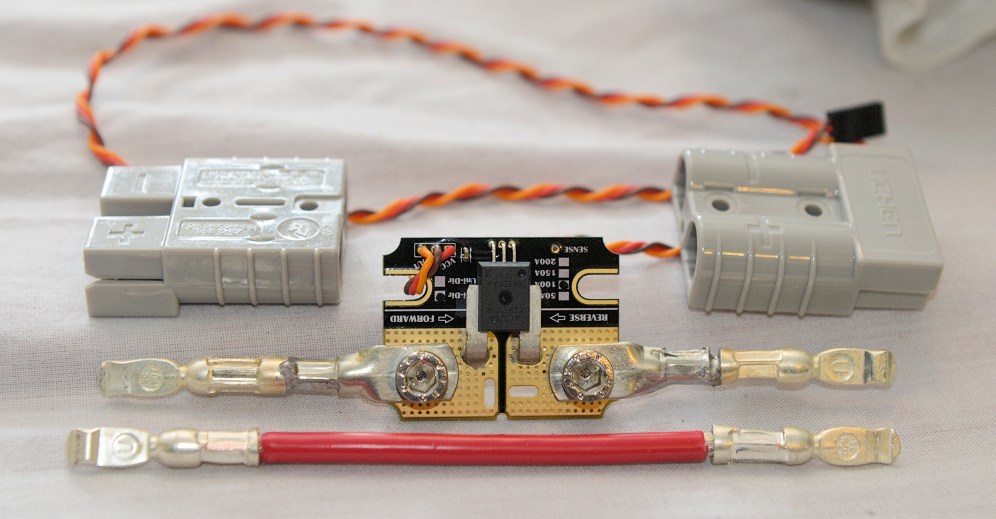
Current sensors...
http://www.wheelchairdriver.com/BM3-con ... -parts.jpg
http://www.wheelchairdriver.com/BM3-con ... rimped.jpg current sensors, 100A rather than 150A.
http://www.wheelchairdriver.com/BM3-con ... derson.jpg
http://www.wheelchairdriver.com/BM3-con ... ensors.jpg
User avatar
Burgerman
Site Admin
 
Posts: 71117
Joined: 27 May 2008, 21:24
Location: United Kingdom

Re: Some thinking and questions about Roboteq

Postby LROBBINS » 15 Nov 2015, 15:56

Maybe its me. But that last script appears to have made acc and dec monumentally slow with the pot turned down!
Seems a sign is reversed or something?
And turn acc has gone very slow even with turn accboost turned up to 1000... Wherever the speed pot is set.


I assume you mean "John 11-14-2015 temp2_mod". I will look over what I wrote and try to figure out what I did wrong. Surely not a sign problem, but quite possibly a 100 somewhere instead of a 10, or a 1000 instead of a 10. Get back to you within a few hours.

BTW - if you ever want to check which script is actually in the Roboteq, open the console tab in Roborun and re-start the script. It will print out whatever is in the 1st line of the script - which I try to keep updated with the name of the file. In C there's a macro that will automatically do this and append the date of the last compile as well, which helps from getting lost in revisions, but in MicroBasic there's no such help, so I'm trying to remember to change that print line.

Ciao,
Lenny
LROBBINS
 
Posts: 5807
Joined: 27 Aug 2010, 09:36
Location: Siena, Italy

Re: Some thinking and questions about Roboteq

Postby Burgerman » 15 Nov 2015, 16:10

Yes the latest one.
Acceleration drastically low, with turning and with anything that isn't allowed "full throttle" like forwards, to full speed (pot setting high). Everything else is super low acceleration.
User avatar
Burgerman
Site Admin
 
Posts: 71117
Joined: 27 May 2008, 21:24
Location: United Kingdom

Re: Some thinking and questions about Roboteq

Postby LROBBINS » 15 Nov 2015, 16:27

Oh my, oh my. I didn't get a sign wrong, and I didn't have an extra 0, but I flipped numerator and denominator of a division - slowed things down as pot reduced rather than speeding them up. I had also somehow deleted one variable name from one line. I hope this one is correct.
Attachments
John 11-14-2015 temp2_mod_corrected.zip
(42.89 KiB) Downloaded 209 times
LROBBINS
 
Posts: 5807
Joined: 27 Aug 2010, 09:36
Location: Siena, Italy

Re: Some thinking and questions about Roboteq

Postby Burgerman » 15 Nov 2015, 16:29

Soon find out!
User avatar
Burgerman
Site Admin
 
Posts: 71117
Joined: 27 May 2008, 21:24
Location: United Kingdom

Re: Some thinking and questions about Roboteq

Postby Burgerman » 15 Nov 2015, 16:39

IF (M1Diff > 0) THEN
M1Delta = (CurvedM1Diff*PowerAccel*10)/SpeedPot
NewM1Accel = NewM1Accel + M1Delta
M1Delta = (CurvedM1Diff*PowerDecel*10/SpeedPot
NewM1Decel = NewM1Decel + M1Delta
END IF


Syntax error; expected: )

And its missing. So should I add a ) to it?

Never mind, done... testing...
User avatar
Burgerman
Site Admin
 
Posts: 71117
Joined: 27 May 2008, 21:24
Location: United Kingdom

Re: Some thinking and questions about Roboteq

Postby LROBBINS » 15 Nov 2015, 16:45

Yes, add it. I fixed it in my copy with motor simulation, but evidently not in the "to use" copy. That ")" goes between the "10" and the "/". I'll fix my copy right now.
Ciao,
Lenny
LROBBINS
 
Posts: 5807
Joined: 27 Aug 2010, 09:36
Location: Siena, Italy

Re: Some thinking and questions about Roboteq

Postby Burgerman » 15 Nov 2015, 17:00

If I turn speed pot down to between 0 to 50 percent, ( 2 to 7mph) that would be 99 perfect.

If I turn it up to 100 percent, then acceleration in the 5 to 10 mph range is still too much. I need the acc boost to only be at the start, and the rest of the curve to be constant rate.

I cant quite see what the 1 to 5 curve settings are changing though. Which should be better here? They all seem the same.

If I turn down M1 and M2 motor acc, and increase boost, same result!

It all seems good now, for a normal speed chair. Better than ever before.

But I need quite high acceleration boost initially for quick response, that starts at 0mph, and tapers away to nothing by 1 to 2mph leaving a reasonably slow acceleration at steady state to 8mph. Because having the ability to wheelie at low speed is good. But not at high speed. So I need a way to tell the boost to end?
User avatar
Burgerman
Site Admin
 
Posts: 71117
Joined: 27 May 2008, 21:24
Location: United Kingdom

Re: Some thinking and questions about Roboteq

Postby Burgerman » 15 Nov 2015, 17:38

What I would like it to do, is like the first terrible drawing. This boosts the first part of the acceleration up to say 15 to 20 percent stick. Leaving the rest constant slightly lower rate.

Rather than the 2nd line, which is what is happening now. Its better like that than nothing, but at 15mph the acceleration still needs a boost at the start, and constant the rest of the way. As it is it increases with the amount of stick.

Was under the impression that the curve adjustment would do this? In fact its hard to tell if thats working at all?
Attachments
Capture.GIF
User avatar
Burgerman
Site Admin
 
Posts: 71117
Joined: 27 May 2008, 21:24
Location: United Kingdom

Re: Some thinking and questions about Roboteq

Postby Williamclark77 » 15 Nov 2015, 18:12

Lenny, I have an HBL2360 you're welcomed to have. If you want to try and replace the MOSFETS I popped. I can stick it in the mail soon. I haven't had time to even look at it other than when I took it apart to share those pictures here. These accel over time issues don't seem to affect brushless though.

I haven't had time to think it through, but why couldn't you add two parameters: A boostaccel and throwaccel. Boostaccel could be the amount added, a percentage of the base accel rate. Throweaccel could be how long it adds it, a percentage of the throttle. Ie - 200% of the accel rate applied to 30% throttle that would taper off as throttle increased. I had done the same but opposite before adding my accel pot. It doesn't affect turning, only the throttle command.
User avatar
Williamclark77
 
Posts: 1183
Joined: 21 Mar 2013, 01:18
Location: South Mississippi, United States

Re: Some thinking and questions about Roboteq

Postby LROBBINS » 15 Nov 2015, 19:30

John,

The curving, if I calculated it correctly, should do what you want - give a faster roll-off of the boost. Doesn't seem to be doing that however, so I'd better look again at what I wrote. Try setting it to 1 and 5 again and see if there's any difference at all, but I could have inverted a fraction or added a 0 somewhere once again! If it is correct, but doesn't work, I'll try to use motor current instead: that should have a rather sharp dropoff soon after starting out.

In the meantime, I want to show you a graph of the simulation of a radically different, and far simpler, way to get steering priority. This is not in any of the scripts I've yet sent you, but I want to whet your appetite. Still depends on getting the accel/decel boost right, but I'm finally confidant that I can do that.
2015_11_15_speed_turn.JPG

Joystick positions are noted in each segment as throttle and steer, while the curves show how speed and turn rate respond. (The simulated motor power curves get kinda jumpy near the endpoints because the simulation moves in chunks, so I left them off and just show the un-mixed Speed and Turn they produce.) At each transition, speed stays constant until the new turn rate is reached (quickly) and then the turn rate stays constant while speed transitions from old to new. I do notice that with this algorithm acceleration is not constant - it does fall off as one approaches the new speed. But that might be true with the algorithm in the scripts you've been using, but the fall off is perhaps not sharp or soon enough. The slope stays quite steep for about half of each transition, then curves to flat. This simulation was done with curving = 1, I'll repeat part of it with curving = 5 as a check on the curving calculations.

The simulation just gives numbers. I knew from the numbers that things were behaving this way, but it's easier to absorb from the graph so I manually copied the numbers over into a spreadsheet. Boring PITA, so don't expect me to routinely do this. If I had an infinite amount of time available, I'd do some QuattroPro scripting to automate the import from the Roborun listing.

Thoughts?

Will,

Thanks for the offer, but I'll pass for now. John and I are both using brushed motors, and I don't have any brushless at all, so it would be of limited use for development work, and of no use as a spare for Rachi's chair. If, down the road, I do want to try brushless, I'd be more than glad to take it off your hands.

Ciao,
Lenny
LROBBINS
 
Posts: 5807
Joined: 27 Aug 2010, 09:36
Location: Siena, Italy

Re: Some thinking and questions about Roboteq

Postby LROBBINS » 15 Nov 2015, 20:12

Just re-ran the first part of the simulation with curving set to 5 instead of 1: going from throttle = 0, steering = 180 (full right turn-in-place) to throttle = 1000, steering = 0. After turn is removed, the first increase in speed is identical with curving = 1 and curving = 5, from speed = 0 to speed = 210, change = 210. It then gets shallower with higher curving. The second step is from 210 to 378, change = 168, with curving = 1, and from 210 to 361, change = 151, with curving = 5, with even more difference down the road. The entire change from speed 0 to 1000 takes 16 times through the simulation loop with curving = 1, and 28 times with curving = 5.

In other words, the curving is calculated correctly, at least in the simulation version (I still have to check the file I sent you to see if it's the same), but it probably is just not a strong enough roll off of the boost. Next thing to try will be weighting by motor current - that should have a quite sharp fall off at the start - and actually makes better physical sense.

Ciao,
Lenny
LROBBINS
 
Posts: 5807
Joined: 27 Aug 2010, 09:36
Location: Siena, Italy

Re: Some thinking and questions about Roboteq

Postby LROBBINS » 15 Nov 2015, 20:48

Yes, I screwed up again. When I looked at the file I sent you, I found a mistake in the curving - but it was also in the simulation program. I used CurvedM1Diff, but M2Diff, so the right motor boost wasn't ever being curved and the two motors were probably also fighting each other! With this corrected, the first speed increase when starting out is again the same, but with curve = 5 the boost falls off more as speed increases. With the corrected math, it took 13 loop cycles with curving=1 to go from speed = 0 to 1000, but 31 cycles with curving=5. I'll get you a corrected file in a few minutes and I think that you will find the effect of curving=5 noticeable, but probably still not enough.
LROBBINS
 
Posts: 5807
Joined: 27 Aug 2010, 09:36
Location: Siena, Italy

Re: Some thinking and questions about Roboteq

Postby LROBBINS » 15 Nov 2015, 20:59

Here's the latest correction. Try it with both curving=1 and curving=5 and let me know how it goes.
Attachments
John 11-14-2015 temp2_mod_corr2.zip
(42.97 KiB) Downloaded 200 times
LROBBINS
 
Posts: 5807
Joined: 27 Aug 2010, 09:36
Location: Siena, Italy

Re: Some thinking and questions about Roboteq

Postby Burgerman » 15 Nov 2015, 21:04

Working on it!
User avatar
Burgerman
Site Admin
 
Posts: 71117
Joined: 27 May 2008, 21:24
Location: United Kingdom

Re: Some thinking and questions about Roboteq

Postby Burgerman » 15 Nov 2015, 23:26

Curving set to 1 has no affect. Low pot, acc is the same as before. A little too slow...

Curving set to 5, its REALLY slow to accelerate on low pot setting! So now it has an affect. But the opposite affect it is supposed to have. But we are getting there!

MY CURRENT SETTINGS, QUITE GOOD BY RC!

Code: Select all
SpeedPotPin = 5            'Analog input number in Roboteq setup.
LeftCurrentSensorPin = 7   'Analog input number.
RightCurrentSensorPin = 8  'Analog input number.
AlarmPin = 6               'Digital output number in roboteq setup used for low voltage alarm.
Brake1Pin = 1              'Dig output number of brake operating in setup.
Brake2Pin = 0              'Dig out number as above, both brakes controlled by pin 1 if 0 choosen.

'JOYSTICK AND SPEEDPOT SETTINGS
Damping = 1                'Number of joystick readings to moving average. 1 to 20 acceptable figures.
SpeedPotInstalled = TRUE   'Is speed potentiometer installed? (TRUE/FALSE)
SpeedPot = 100              'Default if SpeedPotInstalled = FALSE. 90, allows speed headroom for steer/mixing.
SpeedPotLowFault = 30      'Chair speed used if pot fails giving too low voltage.
SpeedPotHighFault = 60     'Chair speed used if pot fails giving too high voltage.

SpeedPotFwdMax = 100       'Percent max forward speed at max speedpot setting. <100 for turn headroom at speed.
SpeedPotFwdMin = 15        'Percent max forward speed at min speedpot setting.
SpeedPotRevMax = 26        'Percent max reverse speed at max speedpot setting.
SpeedPotRevMin = 12        'Percent max reverse speed at min speedpot setting.

TurnPotFwdMax = 16         'Percent max turn rate going forwards at max speedpot setting.
TurnPotFwdMin = 12         'Percent max turn rate going forwards at min speedpot setting.
TurnPotRevMax = 13         'Percent max turn rate going backwards at max pot speed setting.
TurnPotRevMin = 11         'Percent max turn rate going backwards at min pot speed setting.

TurnAtFullSpeed = 100      '100=no reduction of turn rate with speed, 0=turn rate goes to 0 at full speed

' DRIVING CHARACTERISTICS
'the following override the settings in the Roboteq configuration
M1Accel = 350              'Max motor 1 acceleration.
M2Accel = 350              'Max motor 2 acceleration. (Set both the same!)
M1Decel = 300              'Max motor 1 deceleration.
M2Decel = 300              'Max motor 2 deceleration. (Set both the same!)

AccelMotorComp = 0         'Adjust accel & decel for motor compensation 0 = no effect,
DecelMotorComp = 0         'but I have no idea of how sensitive this parameter will prove to be
                           '20 makes a noticeable difference in initial acceleration in bench test


PowerAccel = 45            'boost of accel/decel proportionate to difference between MotorCommand and MotorPower
PowerDecel = 40

PowerCurving = 1           '1=no curving, 2=mild curving, 3=mid curving, 4=strong curving, 5=full curving


TurnAccel = 100            'boost of accel/decel proportionate to diffeence between targetTurnRate
TurnDecel = 100            'and currentTurnRate.

'mixing of acceleraton and deceleration when starting and stopping turns
AccelMix = 800             'TURN ACCELERATION. 0 = no effect of M1-M2 motor power on accel/decl, 100 = full effect
                           'if 100 is not enough, it's OK to try values > 100
DecelMix = 800             'TURN DECELERATION. 0 = no effect of M1-M2 motor power on accel/decl, 100 = full effect
                           'if 100 is not enough, it's OK to try values > 100

' BACK STICK BRAKING
DecelBoost = 20            'Back stick braking. Percent of added deceleration to use if Throttle crosses 0.
                           'effect of this is proportional to how far past 0 the stick is moved.

MotorResistance = 50       'MOTOR COMPENSATION. (SETTING THIS TOO HIGH IS DANGEROUS AND WILL CAUSE A RUNAWAY)
                           'Set to less than motor mOhms, then adjust based on response a little at a time.
                     
UseCurrentSensors = TRUE   'Set to TRUE if using external current sensors on analog inputs
                           'Set to FALSE to use Roboteq's internal motor current estimates. (Erratic results).

'parameters added to allow motor compensation boost at low estimated motor current; irrelevant if
'equipped with motor current sensor
BoostStart = 5             'no boost below this to avoid drift at small or no joystick movements
BoostEnd = 500             'safety limit - make sure there's no boost at 50% or more stick throw
MaxBoostFactor = 1         'increase MotorCompensation by this factor at low currents; 0 = no boost
BoostEndCurrent = 100      'taper boost to zero when this value of motor current (10X amps, e.g. 60 = 6 Amps)
                           'is reached
' PROGRAM TIMING
MainLoopWaitTime = 0       'milliseconds to wait for each cycle through MainLoop: set to 0 for max loop speed
CyclesPerSpeedPotRead = 200/(MainLoopWaitTime+1)'number of cycles between each read of pot
                                                'reduce number of cycles if there is a wait time in main loop
TimeBetweenAmpHrReads = 1000     '1000 mSec = 1 second - time interval between checking current draw
TimeBetweenAmpHrOutputs = 10000  '10000 msec = 10 seconds - time interval for sending current used to display
                                 'device
' MISCELLANEOUS
SuppressPrinting = TRUE    'Set to TRUE to suppress printing to speed and smooth controller/PC
                           'interaction; PRINT of current used will not be suppressed, but is sent only
                           'once every vTimeBetweenAmpHrOutputs msec
AllowSerialInput = FALSE   'Set to TRUE if using serial joystick or emulation
FullRechargeVoltage = 449  'ten times battery voltage; 44.9V = 3.45V/cell - voltage present only
                           'immediately after recharging -- used to reset AmpHrs-used measurement to 0
LowVoltsAlarm = 150        'LENNY tenths of volts, 410 = 3.14V/cell for 13s pack
NoLoadCurrent = 30         'current with no motors running (20 = 2 Amps) YOU SHOULD CHECK THIS ON YOUR CHAIR AND
                           'SET THE VALUE JUST OVER WHAT YOU MEASURE
NoVoltReads = 50           'no. of times to read quiescent volts before averaging
User avatar
Burgerman
Site Admin
 
Posts: 71117
Joined: 27 May 2008, 21:24
Location: United Kingdom

Re: Some thinking and questions about Roboteq

Postby LROBBINS » 16 Nov 2015, 00:28

Yes indeed, another mistake on my part. Leaving out games played with powers of 10 because it's integer arithmetic, the starting point for figuring out boost is:
Code: Select all
M1Diff = abs(M1Calc - M1Power) [i]no curving[/i]
In the corr2 script, I then found the square of that, and the curvings are:
Code: Select all
1 M1Diff
2 (2*M1Diff + M1Diff^2)/3
3 (M1Diff + M1Diff^2)/2
4 (M1Diff + 2*M1Diff^2)/3
5 M1Diff^2

I then multiplied by PowerAccel and divided by SpeedPot. BUT THAT'S WRONG. The SpeedPot correction has to be applied to M1Diff right at the first step, not after curving. If you square before increasing the number by 1/SpeedPot, you get very small boosts indeed when the pot is turned down.

So, here's yet another script. This time I set the parameters equal to the ones you just posted, so it's ready to try. I'm going to bed.

Ciao,
Lenny
Attachments
John 11-14-2015 temp2_mod_corr3 .zip
(42.97 KiB) Downloaded 195 times
LROBBINS
 
Posts: 5807
Joined: 27 Aug 2010, 09:36
Location: Siena, Italy

Re: Some thinking and questions about Roboteq

Postby Burgerman » 16 Nov 2015, 01:15

I will test tomorrow. But I think that it should not be speedpot you are reading.

Acceleration rate should not change with the speedpot. It should change with actual speed. I don't know how you can do that.

So accelerating with speedpot set low or high should be separately adjustable for acceleration. Or, to put that another way (speedpot now on full), acceleration should be adjustable at small stick values, and full stick values. It should be the same thing.

Meaning that 10% stick, has the same acc value as 10% pot and full stick. But adjusted independently, as a MIN ACC instead of ACC.

But the BOOST in acceleration should be road speed related. Greatest around zero mph. Although quite how you would determine speed I don't know. Maybe motor pulsewidth? (Motor power?). Not speedpot.

If this doesn't give you a headache I don't know what will!
User avatar
Burgerman
Site Admin
 
Posts: 71117
Joined: 27 May 2008, 21:24
Location: United Kingdom

Re: Some thinking and questions about Roboteq

Postby Bearded_Blunder » 16 Nov 2015, 06:35

Burgerman wrote:But the BOOST in acceleration should be road speed related. Greatest around zero mph. Although quite how you would determine speed I don't know. Maybe motor pulsewidth? (Motor power?). Not speedpot.

Motor back EMF.. if you've any way to determine it.
Bearded_Blunder
 
Posts: 32
Joined: 15 Nov 2015, 04:54
Location: Northampton, UK

Re: Some thinking and questions about Roboteq

Postby Burgerman » 16 Nov 2015, 08:56

Motor back EMF.. if you've any way to determine it.


We use that for motor impedance compensation already. That doesent determine speed though, only load. You dont want acceleration increases on hills, ramps, curbs, grass or during normal acceleration etc.

It could be based on pre motor compensation intended motor command pulsewidth though. Since voltage = motor speed.
User avatar
Burgerman
Site Admin
 
Posts: 71117
Joined: 27 May 2008, 21:24
Location: United Kingdom

Re: Some thinking and questions about Roboteq

Postby LROBBINS » 16 Nov 2015, 09:31

Motor back EMF = current*motor resistance, so using current to adjust the boost factor would indeed be proportional, not to speed, but to motor load. It is quite high when starting out (motor is essentially stalled), falls off sharply as the torque required goes down, then rises proportionate to speed. Speed is proportional to the product of current and PWM (voltage).

For brushless motors, speed is measured by the Roboteq and acceleration = change in speed over time, which is why Will doesn't experience the sluggish start, increasing acceleration problem. For brushed, Roboteq defines "acceleration" as change in PWM over time, so physical acceleration (change in RPM) is not constant. Exponential curving is an attempt at a simple approximation of the fall off in load at the beginning of the curve, but it may not be enough. As we are using current sensors for each motor, we could alternatively use current itself.

The only place the SpeedPot value enters is to get the same starting boost for high and low speed pot settings, used correctly it does not affect the shape of the change in boost with speed. Suppose you give full forward stick with SpeedPot = 100%, the initial difference between motor command and motor PWM is 1000. Now, same stick but SpeedPot = 50%. The initial difference between motor command and PWM is now just 500 and we'll get half as much starting boost (or even less with the exponential curve), but we're still starting a stalled motor - it will be sluggish starting out, and even more so with as the pot is turned down. Instead, multiply the command-PWM difference by 100/SpeedPot. The equation is (command-PWM)*100/SpeedPot%. At full stick with SpeedPot = 100% we have 1000*100/100 = 1000. At full stick with SpeedPot = 50% we have 500*100/50 = 500*2 = 1000, and with SpeedPot = 10% we get 100*100/10 = 100*10 = 1000, so the starting boost will be the same no matter what the speed pot is set at.

John, your last note was posted today at 2:16AM, so I presume that by tomorrow you mean later today at a more reasonable hour. Let's see how the exponential curve works with the SpeedPot calculation corrected. If acceleration still doesn't fall off sharply enough, I'll try to make a version using motor current - that should at least make the initial dropoff very sharp, but it may have to be handled differently for acceleration and deceleration in the "near target" second-half of the process because when accelerating current is again rising there, but when decelerating it is continuing to fall. If at all possible, I want to avoid programming for "special cases" because I usually get into big trouble if I try to do that. If the "special case" is not defined with absolute precision, some other situation you haven't thought of will unexpectedly fall in that special case and be handled incorrectly. Trying to deal with the earlier MixAccel problem that way cost us at least 6 mos.

Ciao,
Lenny

P.S. When you're not doing anything else (oh yeah), do take a look at those simulation curves I posted yesterday. Does that look like the way you want the chair to behave (except for the high slope that lasts too long)? That is, does this look like nearly-instant steering changes take precedence over speed changes?
LROBBINS
 
Posts: 5807
Joined: 27 Aug 2010, 09:36
Location: Siena, Italy

Re: Some thinking and questions about Roboteq

Postby Bearded_Blunder » 16 Nov 2015, 10:50

Article here on determining motor speed using back EMF :
http://www.precisionmicrodrives.com/app ... m-back-emf
Small motors, but still PWM control.
As the back EMF is generated from the rotor is moving through the magnetic field generated by the permanent magnets, the back EMF is directly proportional to the motor speed, and the motor voltage constant. The motor voltage constant includes parameters like magnetic field strength which are also constant.
equation:
Code: Select all
backEMF =RPM
          Kv


Which is what I remembered from my HND Electrical Engineering course.
Bearded_Blunder
 
Posts: 32
Joined: 15 Nov 2015, 04:54
Location: Northampton, UK

Re: Some thinking and questions about Roboteq

Postby Burgerman » 16 Nov 2015, 11:36

P.S. When you're not doing anything else (oh yeah), do take a look at those simulation curves I posted yesterday. Does that look like the way you want the chair to behave (except for the high slope that lasts too long)? That is, does this look like nearly-instant steering changes take precedence over speed changes?


Yes later today!

And in answer to the above, I am not sure...
User avatar
Burgerman
Site Admin
 
Posts: 71117
Joined: 27 May 2008, 21:24
Location: United Kingdom

Re: Some thinking and questions about Roboteq

Postby LROBBINS » 16 Nov 2015, 13:22

That link http://www.precisionmicrodrives.com/app%20...%20m-back-emf describes how one can calculate RPM of a rotating motor under steady load. It does not describe the situation of the stall-to-near stall state when the motor just starts turning (where we need to strongly boost PWM change per unit time=what Roboteq calls acceleration), nor does it describe what happens when the load suddenly changes, such as climbing over an obstacle like a tree root.
We can calculate the back EMF by measuring the current in steady state with no load (emphasis added) and comparing it to a calculated value for the stall current. We can then use this value with the no load speed and the motor’s constants to calculate the speed for the given back EMF.
and
We now have a way of calculating the back EMF and then in turn the speed of the motor from the measured current draw.
That is, if stall current is not contributing to the "measured current draw".
Ciao,
Lenny
LROBBINS
 
Posts: 5807
Joined: 27 Aug 2010, 09:36
Location: Siena, Italy

Re: Some thinking and questions about Roboteq

Postby Burgerman » 16 Nov 2015, 23:55

Tried many settings. Its usable, I think, but I wouldn't dare back stick brake.
Heres the problems I have.

1. Turning up PowerAccel (= 80 to 100 at the moment) - tried many different settings - gives a curv. Starts steep and high acceleration and so great! It reduces initial lag, makes chair respond, but acceleration tails off far too slowly to mid speed, so too much once rolling, and then takes a week to reach max speed. We reach full speed eventually. Curves change only slightly, and adding more to PowerAccel just means taking more away from M Acceleration. So I still need a large initial acc boost, then a straight line. The problem here is that the acceleration boost needs to end fast - by say 2 or 3mph max, not take the full 0 to 15mph to decline. So we are still getting
2 instead of 1 as shown here:

Image


2. Back stick braking is now way too powerful, and set to: 1, actually stops the chair in 1 second flat from 16mph...

The Curve thing. Now 5 is stronger than 1. In the correct direction. Still not sure exactly what it is doing, but still not quite enough acceleration at the low pot setting, or small stick movements when pot set to max. Although its now better than before.

Testing with these settings at the moment.

Code: Select all
M1Accel = 800
M2Accel = 800
M1Decel = 800
M2Decel = 800

AccelMotorComp = 0     'adjust accel & decel for motor compensation 0 = no effect,
DecelMotorComp = 0     'but I have no idea of how sensitive this parameter will prove to be
                                   '20 makes a noticeable difference in initial acceleration in bench test
'boost of accel/decel proportionate to difference between MotorCommand and MotorPower
PowerAccel = 80
PowerDecel = 15

PowerCurving = 5      '1=no curving, 2=mild curving, 3=mid curving, 4=strong curving, 5=full curving
'boost of accel/decel proportionate to diffeence between targetTurnRate and currentTurnRate

TurnAccel = 100
TurnDecel = 100

'mixing of acceleraton and deceleration when starting and stopping turns
AccelMix = 800 '0 = no effect of M1-M2 motor power on accel/decl, 100 = full effect
                          'if 100 is not enough, it's OK to try values > 100
DecelMix = 800 '0 = no effect of M1-M2 motor power on accel/decl, 100 = full effect
                          'if 100 is not enough, it's OK to try values > 100

' BACK STICK BRAKING
DecelBoost = 1          'percent of added deceleration to use if Throttle crosses 0.
                                'effect of this is proportional to how far past 0 the stick is moved.

MotorResistance = 50       'MOTOR COMPENSATION. (SETTING THIS TOO HIGH IS DANGEROUS)
                          'Set to less than motor mohms and then adjust based on chair response
UseCurrentSensors = TRUE
User avatar
Burgerman
Site Admin
 
Posts: 71117
Joined: 27 May 2008, 21:24
Location: United Kingdom

Re: Some thinking and questions about Roboteq

Postby LROBBINS » 17 Nov 2015, 09:29

Stayed up most of the night working on a completely new version (boy is that geeky behavior or what?), but want to run some extended simulations before you try it. The entire approach to dealing with acceleration is rather different, so it may be a total disaster, but having hit a new "unforeseen consequence" with the hyper crossed zero response (which in retrospect was inevitable) I wanted to again start with a blank sheet.

In the meantime, you can set DecelBoost to 0 (won't help much), leave curving at 5 and do the following:

(1) Turn PowerAccel down to 50 from 80 (just for safety's sake while playing about). Leave the pot at max for steps (1) through (3).

(2) Full forward from zero, no turn. Adjust MiAccel to give a reasonable final acceleration rate. If even setting it at 2000, you can't get the final acceleration fast enough, turn curving back to 4 and try again.
WHAT VALUES OF MiACCEL and CURVING GIVE AN ADEQUATE FINAL ACCELERATION TO FULL SPEED? (Don't pay attention to anything earlier than the last bit of the acceleration, but please do answer this question. Those numbers will be useful for me.)

(3) Leave those MiAccel and Curving values alone and increase PowerAccel to try to get, if possible, a decent starting acceleration with full forward stick, 100% pot, no turning. WHAT VALUE OF PowerAccel, IF ANY, WORKS?

(4) Now turn the pot back to about 50% and repeat the full forward, no turning maneuver. Describe the behavior. The algebra should handle this OK. It does not, however, do anything at all for the problem of starting out with small stick movement; that, like the crossing zero problem, can't be dealt with by the basic structure of MixAccel: in this script.

I will, fingers crossed, get back to you later today with something else to try. But I'm also going to have to get some shuteye.

Ciao,
Lenny
LROBBINS
 
Posts: 5807
Joined: 27 Aug 2010, 09:36
Location: Siena, Italy

PreviousNext

Return to Everything Powerchair

Who is online

Users browsing this forum: emilevirus, JazzyBand, jefferso, slomobile, Superchunk, Yennek and 387 guests


  eXTReMe Tracker