Setting parallel charge to say 2 or 4 simply increases CC charge RATE by the same amount. It does absolutely nothing to thermination current if set to manual, as we do. So its useless... Dont use it.
It works in hobby use as we may have say 4 heli packs to charge at once, and termination is set to say 1/20th of CHARGE CURRENT! Not a fixed mA. So x4A charge and terminates 4x the current. We dont do this and manually set a correct termination. So dont use it!
Starting balance at 3.3V UNBALANCES cells for most of the charge. Why? At this lower voltage the highest cell may well NOT be the fullest one. And the PL8 will take 1A out of it in an attempt to balance the pack incorrectly for almost the whole charge... At 3.4V its OK, as long as very slow charge rate. But that means a few Amps. At 3.5V it correctly begins balancing just before its full where the full cells shoot up higher. And it prevents overshoot by slowing the charge rate before CV if needed. You can just set to balance only at CV. (Disable the balance entire charge) if you want. And if you charge to 3.500V only, you must do that or it wont balance at all.
PL 8 - Q and A section - How to Set up - Use etc,
Re: PL 8 - Q and A section - How to Set up - Use etc,
 by Burgerman » 08 Feb 2019, 12:10
-

Burgerman - Site Admin
- Posts: 71086
- Joined: 27 May 2008, 21:24
- Location: United Kingdom
Re: PL 8 - Q and A section - How to Set up - Use etc,
by Scooterman » 08 Feb 2019, 12:32
Burgerman wrote:Setting parallel charge to say 2 or 5 simply increases CC charge by the same amound. It does absolutely nothing to thermination current if set to manual, as we do. So its useless... Dont use it.
It works in hobby use as we may have say 4 heli packs to charge at once, and termination is set to say 1/20th of CHARGE CURRENT! So x4A charge and terminates 4x the current. We dont do this so dont use it!
Thank you for that I'm so pleased you corrected me
 I was concerned it was a stupid quest but I'm really pleased I asked now. Better to be safe than sorry
Burgerman wrote:Starting balance at 3.3V UNBALANCES cells for most of the charge since at this voltage the highest cell may well NOT be the fullest one. And the PL8 will take 1A out of it the whole charge... At 3.4V its OK, as long as very slow charge rate. At 3.5V it begins just before its full where the full cells shoot up high. And it prevents overshoot. You can just set to balance only at CV. (Disable the charge entire balance) if you want. And if you charge to 3.500V only, you must do that.
I totally get all that, as you say it's the nature of lithium that voltage doesn't shoot up until right at the end.

For the LF90s in 2P8S. I will use your 200Ah preset and tweak the termination current if need be to achieve the desired CV termination time. Also mindful of what Shirley said about the cells being a long time in storage, I will reduce the CC to 20A for an initial number of cycles.
Also after X number of cycles I am planning to reduce the CV to 3.55v. I remember you mentioning that you can eek a few more cycles out the lifepo4s doing that, for the price of a small sacrifice in charge capacity (not sure if that's the correct term)
If you have an opinion as to the number of cylces to get under the belt before reducing to 3.55v I'd appreciate it. You know me, I want everything! (only joking).
-

Scooterman - Posts: 2968
- Joined: 03 Jul 2016, 10:11
- Location: Isle of Wight England
Re: PL 8 - Q and A section - How to Set up - Use etc,
by Burgerman » 08 Feb 2019, 12:38
Once its all working and balanced at 3.600V setting you can drop it to 3.550. Or even 3.500 as long as you set it to balance ONLY AT CV.
But remember that 3.600V is lower already than the manufacturers 3.650V recommended max. So 3.600 is alreay on the safe/lower side.
But remember that 3.600V is lower already than the manufacturers 3.650V recommended max. So 3.600 is alreay on the safe/lower side.
-
Burgerman - Site Admin
- Posts: 71086
- Joined: 27 May 2008, 21:24
- Location: United Kingdom
Re: PL 8 - Q and A section - How to Set up - Use etc,
by Scooterman » 08 Feb 2019, 12:52
Burgerman wrote:But remember that 3.600V is lower already than the manufacturers 3.650V recommended max. So 3.600 is alreay on the safe/lower side.
Okay BM I understand, I'll leave at 3.6v. Maybe in the future I might drop it 3.55v when I'm more familiar with them.
Burgerman wrote:Or even 3.500 as long as you set it to balance ONLY AT CV.
.
In the interest of learning. I guess that's because at 3.5v you're quite near the cusp of the voltage shooting up so what you said previously about the cell at the highest voltage might not necessarily be the fullest holds true. So you wait until the CV stage to balance.
But if I've got that wrong, I don't mind making an a*** of myself, again...

-
Scooterman - Posts: 2968
- Joined: 03 Jul 2016, 10:11
- Location: Isle of Wight England
Re: PL 8 - Q and A section - How to Set up - Use etc,
by Burgerman » 08 Feb 2019, 12:58
Correct. At less than 3.45V the voltage does NOT say which cell is the fullest. So by bleeding off 1000mA here you may be unbalancing the pack by capacity which is wrong!
So you need to wait to see which cells suddenly go balistic. That rapid voltage rise happens when full. That begins at 3.45V or more. So balancing at 3.5V upwards makes sense. If you set it to 3.500v and then set CV charge voltage to the same, then any cell that doesent reach 3.5 will get ignored. So then we must choose to disable entire charge, so it balances at CV only. Works fine too. But it may allow a brief overshoot. Takes a few secs for the charger to throttle back. Not a problem.
So you need to wait to see which cells suddenly go balistic. That rapid voltage rise happens when full. That begins at 3.45V or more. So balancing at 3.5V upwards makes sense. If you set it to 3.500v and then set CV charge voltage to the same, then any cell that doesent reach 3.5 will get ignored. So then we must choose to disable entire charge, so it balances at CV only. Works fine too. But it may allow a brief overshoot. Takes a few secs for the charger to throttle back. Not a problem.
-
Burgerman - Site Admin
- Posts: 71086
- Joined: 27 May 2008, 21:24
- Location: United Kingdom
Re: PL 8 - Q and A section - How to Set up - Use etc,
by Scooterman » 08 Feb 2019, 15:48
I see BM thank you.
I think I've turned a corner and am finally beginning to understand it now. At least the basics....
So just for illustration purposes it would look like this, charge amps obviously depending on Ah rating
I think I've turned a corner and am finally beginning to understand it now. At least the basics....
So just for illustration purposes it would look like this, charge amps obviously depending on Ah rating
- Attachments
-
-
-
Scooterman - Posts: 2968
- Joined: 03 Jul 2016, 10:11
- Location: Isle of Wight England
Re: PL 8 - Q and A section - How to Set up - Use etc,
by Scooterman » 08 Feb 2019, 17:34
Burgerman wrote:Yep!
Out of interest can you do the same with lipos to extend their lifetime, but obviously a higher CV value.
I've read the voltage doesn't shoot up at the end quite as quickly for lipo as it does for lifepo4. I guess that makes it a bit easier.
Btw it's chucking it down with rain here, it has been all day.
-
Scooterman - Posts: 2968
- Joined: 03 Jul 2016, 10:11
- Location: Isle of Wight England
Re: PL 8 - Q and A section - How to Set up - Use etc,
by Burgerman » 08 Feb 2019, 17:53
Yep...
Esp important on laptop or lipo battery packs as these have 200 to 500 FULL cycles.
My now 3 year old laptop battery is as good as new as I told it to charge to 75 to 80% full in the bios. And that the last 20 was out of bounds. So it shuts down. This means I only have the middle 60% to work with.
So in the case below, on some tests on a small phone sized battery, they tried charging to a higher voltage. Look what it does. And have a guess why Tesla charges their batteries to around 85% max?
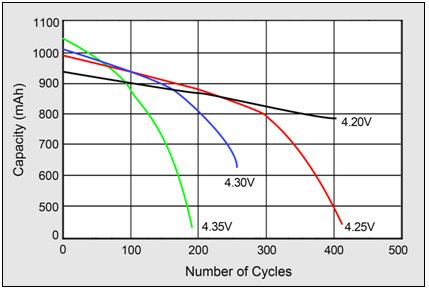
Again, then, this is why you must fit as many Ah as possible, charge less than full, never go near empty. Lithium hates full, empty, and high currents! Loves to be sat at 30 to 70% and will last forever.
Esp important on laptop or lipo battery packs as these have 200 to 500 FULL cycles.
My now 3 year old laptop battery is as good as new as I told it to charge to 75 to 80% full in the bios. And that the last 20 was out of bounds. So it shuts down. This means I only have the middle 60% to work with.
So in the case below, on some tests on a small phone sized battery, they tried charging to a higher voltage. Look what it does. And have a guess why Tesla charges their batteries to around 85% max?
Again, then, this is why you must fit as many Ah as possible, charge less than full, never go near empty. Lithium hates full, empty, and high currents! Loves to be sat at 30 to 70% and will last forever.
-
Burgerman - Site Admin
- Posts: 71086
- Joined: 27 May 2008, 21:24
- Location: United Kingdom
Re: PL 8 - Q and A section - How to Set up - Use etc,
by Scooterman » 08 Feb 2019, 17:56
That’s clever. I bet your knowledge of batteries and other technical stuff has saved you a lot of money over the years
-
Scooterman - Posts: 2968
- Joined: 03 Jul 2016, 10:11
- Location: Isle of Wight England
Re: PL 8 - Q and A section - How to Set up - Use etc,
by Scooterman » 08 Feb 2019, 18:02
Burgerman wrote:Yep...
Esp important on laptop or lipo battery packs as these have 200 to 500 FULL cycles.
My now 3 year old laptop battery is as good as new as I told it to charge to 75 to 80% full in the bios. And that the last 20 was out of bounds. So it shuts down. This means I only have the middle 60% to work with.
So in the case below, on some tests on a small phone sized battery, they tried charging to a higher voltage. Look what it does. And have a guess why Tesla charges their batteries to around 85% max?
Again, then, this is why you must fit as many Ah as possible, charge less than full, never go near empty. Lithium hates full, empty, and high currents! Loves to be sat at 30 to 70% and will last forever.
I will do the same when I get a windows laptop
-
Scooterman - Posts: 2968
- Joined: 03 Jul 2016, 10:11
- Location: Isle of Wight England
Re: PL 8 - Q and A section - How to Set up - Use etc,
by Burgerman » 08 Feb 2019, 18:17
You can see why a BMS repeatedly bouncing a 3.6V charge cell to 3.8v for half a day while the other cells catch up is not very clever then! 
Battery Murdering System.
Still could be even worse, theres a guy on here who is charging a 3.6V lifepo4 pack as a 4.2V lipo! And he doesent listen. His choice but it will all end in tears!
Battery Murdering System.
Still could be even worse, theres a guy on here who is charging a 3.6V lifepo4 pack as a 4.2V lipo! And he doesent listen. His choice but it will all end in tears!
-
Burgerman - Site Admin
- Posts: 71086
- Joined: 27 May 2008, 21:24
- Location: United Kingdom
Re: PL 8 - Q and A section - How to Set up - Use etc,
by Burgerman » 08 Feb 2019, 18:27
Suggested reading.
https://batteryuniversity.com/learn/art ... _batteries
Where I stole the graph from. This is a very useful info page. Mostly lithium ion rather than LiFePO4 but same basic rules apply.
https://batteryuniversity.com/learn/art ... _batteries
Where I stole the graph from. This is a very useful info page. Mostly lithium ion rather than LiFePO4 but same basic rules apply.
-
Burgerman - Site Admin
- Posts: 71086
- Joined: 27 May 2008, 21:24
- Location: United Kingdom
Re: PL 8 - Q and A section - How to Set up - Use etc,
by Gnomatic » 08 Feb 2019, 18:59
Burgerman wrote:
My now 3 year old laptop battery is as good as new as I told it to charge to 75 to 80% full in the bios. And that the last 20 was out of bounds. So it shuts down. This means I only have the middle 60% to work with.
I will now check my laptop BIOS to see if it has a similar setting .....
- Gnomatic
- Posts: 2124
- Joined: 24 Aug 2012, 17:18
- Location: Ohio USA
Re: PL 8 - Q and A section - How to Set up - Use etc,
by Burgerman » 08 Feb 2019, 19:47
Modern dell ones do! Actually its even better, it allows you to choose by working day hours, day of week etc too.
Or simple options:
Or simple options:
ExpressCharge – Quickly charges the battery using Dell fast-charge technology. Recommended for users who
need the battery to charge within a short period of time. If the system is powered off,then the battery typically
charges to 80% within one hour and 100% in two hours. Charge time may be longer if the system is powered on.
NOTE: The ExpressCharge setting may cause battery health to diminish more quickly than other settings.
Primarily AC – Extends battery life by lowering the charge threshold, so that the battery never charges to 100%
capacity. Recommended for users who primarily operate the system while plugged into an external power
source.
Custom – User selects when the battery starts and stops charging. Recommended for advanced users.
Standard – Fully charges the battery at a moderate rate. This setting provides a balanced approach to extending
battery life while still providing a reasonably fast charging time. Recommended for users who frequently switch
between battery power and external power sources
-
Burgerman - Site Admin
- Posts: 71086
- Joined: 27 May 2008, 21:24
- Location: United Kingdom
Re: PL 8 - Q and A section - How to Set up - Use etc,
by Gnomatic » 09 Feb 2019, 00:59
Unfortunately, my 2015 Asus Zenbook does not have any of these options in the BIOS.
- Gnomatic
- Posts: 2124
- Joined: 24 Aug 2012, 17:18
- Location: Ohio USA
Re: PL 8 - Q and A section - How to Set up - Use etc,
by Burgerman » 09 Feb 2019, 01:09
You will have the typical 1 to 2 year and/or 200 to 500 cycle life battery then. Some of the manufacturers are waking up and figuring this stuff out. Dell seems to be one of them. My last 2 dell laptops allowed this sort of adjustment. You may be able to find a better battery management driver than the generic one, that allows it to be controlled in windows.
-
Burgerman - Site Admin
- Posts: 71086
- Joined: 27 May 2008, 21:24
- Location: United Kingdom
Re: PL 8 - Q and A section - How to Set up - Use etc,
by Scooterman » 09 Feb 2019, 10:41
BM - Re cell internal resistance in parallel cells for example 4P1S. Does the PL8 see the total internal resistance of say 4P as
1/RT = 1/R1 + 1/R2 + 1/R3 + 1/R4
If so is it 1/RT that opposing the charge current?
What about discharge, and what about parallel LA batteries regarding internal resistance?
Just curious
1/RT = 1/R1 + 1/R2 + 1/R3 + 1/R4
If so is it 1/RT that opposing the charge current?
What about discharge, and what about parallel LA batteries regarding internal resistance?
Just curious
-
Scooterman - Posts: 2968
- Joined: 03 Jul 2016, 10:11
- Location: Isle of Wight England
Re: PL 8 - Q and A section - How to Set up - Use etc,
by Scooterman » 09 Feb 2019, 11:05
Also for series cells or batteries is the total internal resistance of the circuit RT = R1 + R2, etc
-
Scooterman - Posts: 2968
- Joined: 03 Jul 2016, 10:11
- Location: Isle of Wight England
Re: PL 8 - Q and A section - How to Set up - Use etc,
by Burgerman » 09 Feb 2019, 11:52
On LiPo and with short cables, int resistance works really well. And obviously its the resistance of each cell group, no matter in parallel or one big cell. It just looks for the measured cell voltage under charge or discharge load. Ohms law.
On longer cables it adds these in too and mucks up the measurements!
On lead, because of peukert you cant measure resistance this way. So those need to be measure as an AC impedance to prevent capacitance, and the surface charge effect giving daft results. So measuring DC resistance of lead batteries is pointless. The faster you do it, the lower resistance they appear to be. As the voltage drops fast over the first fractions of a second, and keeps falling. So ohms law only shows you the the error of measuring it that way!
On longer cables it adds these in too and mucks up the measurements!
On lead, because of peukert you cant measure resistance this way. So those need to be measure as an AC impedance to prevent capacitance, and the surface charge effect giving daft results. So measuring DC resistance of lead batteries is pointless. The faster you do it, the lower resistance they appear to be. As the voltage drops fast over the first fractions of a second, and keeps falling. So ohms law only shows you the the error of measuring it that way!
-
Burgerman - Site Admin
- Posts: 71086
- Joined: 27 May 2008, 21:24
- Location: United Kingdom
Re: PL 8 - Q and A section - How to Set up - Use etc,
by Scooterman » 09 Feb 2019, 12:11
Ah so the PL8 measured internal resistance on charge and discharge must vary depending on the charge and discharge amps, because of the volt drop in the cables, especially at higher amps.
Or have I misunderstood?
Or have I misunderstood?
-
Scooterman - Posts: 2968
- Joined: 03 Jul 2016, 10:11
- Location: Isle of Wight England
Re: PL 8 - Q and A section - How to Set up - Use etc,
by Burgerman » 09 Feb 2019, 12:19
It just uses ohms law. While its charging, or discharging it actually stops, takes voltage measurements OFF LOAD rapidly all the time. You need an occiloscope to see it. So it knows:
Actual unloaded cell voltage.
Loaded cell voltage (charge or discharge amps and voltage)
It can then compare the unloaded voltage, to the loaded voltage at x Amps, and ohms law tells it the resistance. Its doing that all the time, rapidly so you cant see it.
Like this.
Voltage at say 5A CHARGE is hIgher by .15V than it is at 0A. So ohms law can tell you the resistance of 5A and .15V is 0.03Ohm. Thats all its doing, per cell.
http://www.ohmslawcalculator.com/ohms-law-calculator
Actual unloaded cell voltage.
Loaded cell voltage (charge or discharge amps and voltage)
It can then compare the unloaded voltage, to the loaded voltage at x Amps, and ohms law tells it the resistance. Its doing that all the time, rapidly so you cant see it.
Like this.
Voltage at say 5A CHARGE is hIgher by .15V than it is at 0A. So ohms law can tell you the resistance of 5A and .15V is 0.03Ohm. Thats all its doing, per cell.
http://www.ohmslawcalculator.com/ohms-law-calculator
-
Burgerman - Site Admin
- Posts: 71086
- Joined: 27 May 2008, 21:24
- Location: United Kingdom
Re: PL 8 - Q and A section - How to Set up - Use etc,
by steves1977uk » 09 Feb 2019, 12:29
Modern dell ones do! Actually its even better, it allows you to choose by working day hours, day of week etc too.
Or simple options:ExpressCharge – Quickly charges the battery using Dell fast-charge technology. Recommended for users who
need the battery to charge within a short period of time. If the system is powered off,then the battery typically
charges to 80% within one hour and 100% in two hours. Charge time may be longer if the system is powered on.
NOTE: The ExpressCharge setting may cause battery health to diminish more quickly than other settings.
Primarily AC – Extends battery life by lowering the charge threshold, so that the battery never charges to 100%
capacity. Recommended for users who primarily operate the system while plugged into an external power
source.
Custom – User selects when the battery starts and stops charging. Recommended for advanced users.
Standard – Fully charges the battery at a moderate rate. This setting provides a balanced approach to extending
battery life while still providing a reasonably fast charging time. Recommended for users who frequently switch
between battery power and external power sources
Think my Dell M6700 has those options, I use the ExpressCharge setting which it came set up with. The battery has lasted 5+ years, so will get a new one for it soon and use the custom settings.
Steve
-

steves1977uk - Posts: 4400
- Joined: 20 Oct 2011, 21:47
- Location: Wells next the Sea, Norfolk, UK
Re: PL 8 - Q and A section - How to Set up - Use etc,
by Scooterman » 09 Feb 2019, 12:40
Burgerman wrote:It just uses ohms law. While its charging, or discharging it actually stops, takes voltage measurements OFF LOAD rapidly all the time. You need an occiloscope to see it. So it knows:
Actual unloaded cell voltage.
Loaded cell voltage (charge or discharge amps and voltage)
It can then compare the unloaded voltage, to the loaded voltage at x Amps, and ohms law tells it the resistance. Its doing that all the time, rapidly so you cant see it.
Like this.
Voltage at say 5A CHARGE is hIgher by .15V than it is at 0A. So ohms law can tell you the resistance of 5A and .15V is 0.03Ohm. Thats all its doing, per cell.
http://www.ohmslawcalculator.com/ohms-law-calculator
Oh I see, that’s clever.
Thank you
-
Scooterman - Posts: 2968
- Joined: 03 Jul 2016, 10:11
- Location: Isle of Wight England
Re: PL 8 - Q and A section - How to Set up - Use etc,
by Burgerman » 09 Feb 2019, 17:00
Take a look at loaded and unloaded power supply voltage. Same thing. It is a pulse width device. So to charge at 6V from a 24V supply it powers the battery with a 25% pulsewidth. Well it actually isnt that simple but close. So it leaves 75% of the time when its an unloaded power supply.
If you look at the frequency it runs at you have a choice of 3... Thats the speed it switches on/off.
125
62.6
31.25 Khz
The higher the frequency, the lower the efficiency but the higher the power output can be without increasing the size of components. So you can use a lower 31.25Khz for better efficiency on low power presets. But this is just the frequency of operation. The pulsewidth % remains the same.
If you look at the frequency it runs at you have a choice of 3... Thats the speed it switches on/off.
125
62.6
31.25 Khz
The higher the frequency, the lower the efficiency but the higher the power output can be without increasing the size of components. So you can use a lower 31.25Khz for better efficiency on low power presets. But this is just the frequency of operation. The pulsewidth % remains the same.
-
Burgerman - Site Admin
- Posts: 71086
- Joined: 27 May 2008, 21:24
- Location: United Kingdom
Re: PL 8 - Q and A section - How to Set up - Use etc,
by Scooterman » 09 Feb 2019, 17:53
Thank you, that's another thing I now know
learning all the time
learning all the time
-
Scooterman - Posts: 2968
- Joined: 03 Jul 2016, 10:11
- Location: Isle of Wight England
Re: PL 8 - Q and A section - How to Set up - Use etc,
by Burgerman » 09 Feb 2019, 18:02
Well the description is simplistic. Its what happens in a system where you want a lower voltage out, compared to the voltage supply. Like a motor controller or the PL8 when it has a 24v supply and is charging at 12V (A 50% pulsewidth).
See here:
Thats what it does in reduction or buck mode.
But it has a boost mode too. Where it takes say 12V and charges at 24... A built in step up inverter. It then works in boost mode. That will cause smoke to come out of your ears. And it may need both systems during a single charge depending on supply and battery voltages.
See here:
- pwm2.gif (7.01 KiB) Viewed 4979 times
Thats what it does in reduction or buck mode.
But it has a boost mode too. Where it takes say 12V and charges at 24... A built in step up inverter. It then works in boost mode. That will cause smoke to come out of your ears. And it may need both systems during a single charge depending on supply and battery voltages.
-
Burgerman - Site Admin
- Posts: 71086
- Joined: 27 May 2008, 21:24
- Location: United Kingdom
Re: PL 8 - Q and A section - How to Set up - Use etc,
by Scooterman » 09 Feb 2019, 18:56
Burgerman wrote:
But it has a boost mode too. Where it takes say 12V and charges at 24... A built in step up inverter. It then works in boost mode. That will cause smoke to come out of your ears. And it may need both systems during a single charge depending on supply and battery voltages.
Oh, is that why Lenny said in different thread that it could be run ‘out in the field’ from a 12v car if need be? I just assumed he had senior moment and discounted what he said
-
Scooterman - Posts: 2968
- Joined: 03 Jul 2016, 10:11
- Location: Isle of Wight England
Re: PL 8 - Q and A section - How to Set up - Use etc,
by Burgerman » 09 Feb 2019, 19:30
How do you suppose it can charge an 8S lipo at 29.40v from a 12 or 24V supply? 
Or my chair from my van as I drive. The PL8 is magic.
Or my chair from my van as I drive. The PL8 is magic.
-
Burgerman - Site Admin
- Posts: 71086
- Joined: 27 May 2008, 21:24
- Location: United Kingdom
Re: PL 8 - Q and A section - How to Set up - Use etc,
by Gnomatic » 09 Feb 2019, 20:55
The PL8 v2's voltage input range is 10-32v. The newer version with the built in bump controller(not a useful feature for our purposes) can handle up to a 48v supply voltage. Its about the only advantage their new charger has.
BM do you plan on testing the PL8T at some point?
BM do you plan on testing the PL8T at some point?
- Gnomatic
- Posts: 2124
- Joined: 24 Aug 2012, 17:18
- Location: Ohio USA
Return to Everything Powerchair
Who is online
Users browsing this forum: Bing [Bot] and 197 guests
