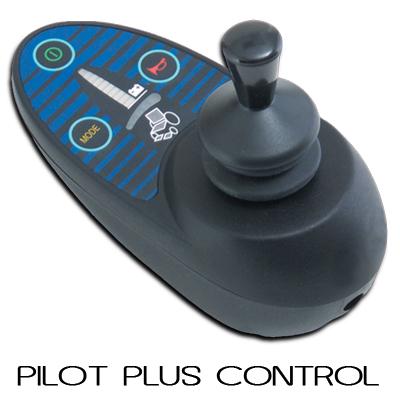
PINNED - Info on PROGRAMMING PGDT and others

Power wheelchair board for REAL info!

POWERCHAIR MENU! www.wheelchairdriver.com/powerchair-stuff.htm

Re: DIY PGDT interface for OEM PROGRAMMING

Postby WDMSetc » 23 Jul 2014, 12:26

The communication protocol used by the various manufacturers is proprietary and may even vary between their various controller types.

IMO you will never be able to produce a simple plug in universal interface.


Yes, but if there is commonality at the hardware layer, protocols are "just software". Providing "hooks" so others can explore individual makes/models lowers the bar for others (interested parties) to "decode" those specifics.

Even differences in the hardware I/F layer are easier to accommodate once you've built some scaffolding that simplifies the data collection, protocol observation, protocol emulation, etc. A new hardware I/F "simply" requires designing the low-level interface to the electronics -- in a manner consistent with the upper levels of the I/F.

It sounds like my best course of action is just to cobble together an interface for the chair that I have, tie the chair in with the balance of my system and offer it up as a "proof of concept" -- and hope it inspires others to undertake similar approaches.

I'll get out the Dremel and start cutting foils. Probably easier than reverse engineering the existing design and trying to reflash it.

Thanks!
WDMSetc
 
Posts: 89
Joined: 23 Jul 2014, 02:26
Location: SW USA

Re: DIY PGDT interface for OEM PROGRAMMING

Postby woodygb » 23 Jul 2014, 12:38

User avatar
woodygb
 
Posts: 7128
Joined: 12 Mar 2011, 18:45
Location: Bedford UK

Re: DIY PGDT interface for OEM PROGRAMMING

Postby WDMSetc » 27 Jul 2014, 22:07

I'm going to revisit some of my "sources" this week and pull as many DIFFERENT controllers ("power modules") off as many chairs as I can. Should I take care to *also* pull the joystick controllers off each of these chairs? Or, are they relatively universal? (I recall seeing a couple with LCD displays).

I assume the programming port and joystick port (from the perspective of the power module) can both be active at the same time. I.e., you can have a programmer attached while "evaluating" the setting changes that you are making. How "smart" are the "power modules" (I keep wanting to call them "controllers") at resolving conflicting inputs?

E.g., if you are currently full stick and change the MAX SPEED setting, is the change immediately reflected in the chair's actions? So, if you have increased the setting, the chair "suddenly" speeds up; similarly, decreasing the setting causes it to suddenly slow down?

What's the best source of hardware-layer documentation for the two interfaces (programming and joystick)? I.e., so I can prepare some signal conditioning circuitry to connect the interfaces to a logic analyzer to capture the transactions (as a first step to decoding them -- which I imagine hasn't yet been done).

Do any chairs have "dual ended" motors (so I can attach an encoder directly to the back side of the motor instead of having to compete with the mechanical mounting of the wheel/gearbox)?

Are any "power modules" more desirable to hack than others? Presumably, the module (and matching? joystick) don't really care about the chair to which they are married (assuming you can tweek things in the controller to better "match" the motors).

Sorry for all the questions... I just want to make the most of this coming "expedition" so I don't end up forgetting something and having to return a week (or more) later, only to find the chair(s) already scrapped!
WDMSetc
 
Posts: 89
Joined: 23 Jul 2014, 02:26
Location: SW USA

Re: DIY PGDT interface for OEM PROGRAMMING

Postby woodygb » 27 Jul 2014, 22:32

power module type and joystick type are matched to each other ...there will however be a variety of joysticks of the same genre that have added functions.

I think some of the Dynamic range has a "brain" in the joystick ...whilst others / most have the "brain" residing in the power module.

I've never tried to alter PGDT settings on the fly ... I suspect that it can't be done as your using the Inhibit line for communication ... I'll check later with a PGDT VSi.

I have however done so with Curtis scooter controllers.

What's the best source of hardware-layer documentation
...Ummm ..NONE to my knowledge.

Do any chairs have "dual ended" motors
Not to my knowledge .
User avatar
woodygb
 
Posts: 7128
Joined: 12 Mar 2011, 18:45
Location: Bedford UK

Re: DIY PGDT interface for OEM PROGRAMMING

Postby woodygb » 27 Jul 2014, 22:39

You cannot alter the PGDT settings on the fly .... you have to have the joystick at neutral before you can write the new parameters.
User avatar
woodygb
 
Posts: 7128
Joined: 12 Mar 2011, 18:45
Location: Bedford UK

Re: DIY PGDT interface for OEM PROGRAMMING

Postby WDMSetc » 27 Jul 2014, 22:46

woodygb wrote:power module type and joystick type are matched to each other ...there will however be a variety of joysticks of the same genre that have added functions.


Hmmm... OK. So, a "power module" paired with a CG3 joystick may be willing to talk to a CG2?

I think some of the Dynamic range has a "brain" in the joystick ...whilst others / most have the "brain" residing in the power module.


But, presumably, they either have a different comms protocol or just exchange crude SCADA functions between the two. I.e., it's unlikely that a brain *in* the joystick controller would handle the actual PWM control loop but, rather, would *tell* a "simpler brain" in the power module how to act.

I've never tried to alter PGDT settings on the fly ... I suspect that it can't be done as your using the Inhibit line for communication ... I'll check later with a PGDT VSi.


So, it's a Microsoft style approach ("please reboot to update your settings") even though it's not as time consuming a process? Easier to implement as the designers don't have to worry about races, etc.

I have however done so with Curtis scooter controllers.


Because they have a different hardware-layer interface between the two boxes?

[hardware-layer documentation]

...Ummm ..NONE to my knowledge.


<frown> Then I had better plan on "sacrificing" a few joystick controllers and power modules.

["dual ended" motors]

Not to my knowledge .


<frown> I guess I kind of guessed that would be the case. I'll have to see if I can coax one of my MechE friends to come up with a simple design/modification for me. Maybe an "outboard" gear to drive a parallel axle/shaft. <ick!>

Crap, this is turning into a fair bit of work! :cry:
WDMSetc
 
Posts: 89
Joined: 23 Jul 2014, 02:26
Location: SW USA

Re: DIY PGDT interface for OEM PROGRAMMING

Postby WDMSetc » 27 Jul 2014, 22:50

woodygb wrote:You cannot alter the PGDT settings on the fly .... you have to have the joystick at neutral before you can write the new parameters.


Well, that's also to be expected. Takes a lot more thinking/planning to be able to "safely" accommodate random changes to any control algorithm IN USE. And, designing those parameters so they only interact SAFELY (unless you allow entire SETS of changes to be implemented as a unit -- e.g., increase max speed setting while simultaneously decreasing max turn speed).

Of course, makes it a bit harder to evaluate the effectiveness of those changes:
twiddle parameter
run chair
stop
twiddle parameter
run chair
try to remember what it felt like previously
stop
WDMSetc
 
Posts: 89
Joined: 23 Jul 2014, 02:26
Location: SW USA

Re: DIY PGDT interface for OEM PROGRAMMING

Postby woodygb » 27 Jul 2014, 23:00

You could probably add an encoder to the Ass end of most right angle gearboxes ...there is usually only a plastic or steel cover blanking over the shaft end.Image

I think that the GC2 and GC3 are NOT interchangeable.

You can however get joysticks with extra buttons that will also operate ancillary devices.

Image

Image
User avatar
woodygb
 
Posts: 7128
Joined: 12 Mar 2011, 18:45
Location: Bedford UK

Re: DIY PGDT interface for OEM PROGRAMMING

Postby WDMSetc » 27 Jul 2014, 23:05

woodygb wrote:You could probably add an encoder to the Ass end of most right angle gearboxes ...there is usually only a plastic or steel cover blanking over the shaft end.


But I imagine that end of the shaft just terminates in a bearing/bushing? I.e., nothing "sticking out" to which you could attach encoder? I'll see if I can find a chair with motors/gearboxes thusly arranged and just pull one to investigate.

Returning to H/W interfaces... are they *all* (joystick and programming) 0-5V levels? I.e., could I just hang a logic analyzer on them directly without any level translation/protection?
WDMSetc
 
Posts: 89
Joined: 23 Jul 2014, 02:26
Location: SW USA

Re: DIY PGDT interface for OEM PROGRAMMING

Postby LROBBINS » 28 Jul 2014, 08:34

The motors I've had apart, whether right angle or in line, have their solenoid operated parking brake mounted on the rear end with a shaft that is not covered at the end. I think that it wouldn't be difficult to machine a simple encoder coupling right there.

The Dynamic systems do indeed have their "master" brain in the joystick box (or specialty control, e.g. if using a head switch array), a "slave" brain in the power module, and even simpler processors in other modules, such as the Combined Lighting and Actuator Module. Communications among them is by a proprietary variant of CAN - not just their own high-level protocol, but also has some safety-related modifications of the physical layer - they actually hold a patent for the low level mods (probably run out by now). Parameters are adjusted over CAN using either a Hand Held Programmer, or the PC "Wizard" (requires a licensing dongle that comes in various flavors - from one for the factory floor that allows downloading only a predetermined set of parameters, to "tech" that allows changing only some parameters, to "OEM" that lets one change most parameters, to "Engineering" - available only to Dynamic's own engineers that allows low-level modifications. Parameters can be changed while the system is still turned on, though the motors need to be stopped, but writing them to EEPROM only happens with shutdown and re-start. The full parameter set is stored in EEPROM in both the joystick module and the PM, so that if a module needs to be replaced it can usually pick up the user's settings without needing to check and adjust each parameter. The joystick "pot" is either an inductive or Hall-effect joystick with a swing around Vcc/2 (Vcc generally 5V), but many have two outputs per axis and the chair will shut down if the two don't match. They also swing something less than rail-to-rail so that a broken lead or short is detected as an out-of-bounds value. Response to joystick position is not, in general, immediate - there are various acceleration parameters that determine how quickly the chair responds. Typical commercial chairs have way to much delay set, especially in turning, and that actually makes them hard to control with any precision. Burgerman has a good description on the parent site of how to program P&G controllers for driveability, and the process is similar for Dynamic.

Instead of trying to gather information just by Q&A here, however, I suggest that you go to the Dynamic website, register in some kind of professional category (you don't have to provide credentials) and start downloading their manuals. They will not have hardware information (they definitely don't give that out, though will sometimes answer specific questions - such as the spec on a tact switch I needed to replace), but are otherwise quite complete.

If you really want low-level control, I think you'll have to forgo the use of standard mobility controllers and turn to something like the Roboteq that a number of us are playing with. John and Will have brushed and brushless variants of a high-current model on their chairs, and I am working on an open-software, open-hardware CANbus system for same. (Mostly following the same basic scheme as Dynamic; power control programming resides in the Roboteq MCU, while each other node has its own MCU, with the one in the joystick being "master".) Using the Roboteq gives power and flexibility, but achieving the same level of safety as with standard WC controllers requires lots of care. It will be a while until we know about the reliability of these as well.

Ciao,
Lenny
LROBBINS
 
Posts: 5807
Joined: 27 Aug 2010, 09:36
Location: Siena, Italy

Re: DIY PGDT interface for OEM PROGRAMMING

Postby WDMSetc » 28 Jul 2014, 09:54

The motors I've had apart, whether right angle or in line, have their solenoid operated parking brake mounted on the rear end with a shaft that is not covered at the end. I think that it wouldn't be difficult to machine a simple encoder coupling right there.


Yes, that is true of the motors on the chair I am playing with. But, there is physically no room between the back end of the (in-line) left motor and back end of the right motor for anything else. I.e., I would have to remove the brake and install the encoder in its place (on each motor).

If I can't find a "more suitable" chair this week, I will probably just modify the gearbox housing and integrate the encoder within (doing anything outboard of the wheels would make the chair wider).

Note that the encoder is just a kludge solution -- it lets me use my existing servo driver "as is" without having to rewrite any of the control loop algorithms to elide the encoder.

Typical commercial chairs have way to much delay set, especially in turning, and that actually makes them hard to control with any precision.


Experience has taught me that trying to cascade another control loop on one that wasn't originally designed with that in mind leads to all sorts of headaches. Especially if the inner loop can be altered (as in the "reprogramming" you mention).

So, the first task in a project like this has always been finding a way to "dumb down" the inner loop. E.g., dynamically feeding setpoints to a PWM controller (i.e., a very predictable sort of control loop) instead of letting something else make those decisions (compensation, etc.).

Instead of trying to gather information just by Q&A here, however, I suggest that you go to the Dynamic website, register in some kind of professional category (you don't have to provide credentials) and start downloading their manuals.


I have no particular interest in Dynamic's products. The point of my questions is two fold:
- is there a better chair that I should keep my eyes open for on my next "expedition"?
- what sorts of differences exist between control systems?

The first question is designed to just make my life simpler -- if I can find a "more suitable" chair (by knowing what to look for), then I can spend my efforts on that instead of this arbitrarily chosen chair (which was selected based on the crtieria of: how easy is it for me to stuff it in the trunk of the car; how small is it to operate within our "non accessible" home). Comments like "XYZ is a very common chair" or "very few people own UVW chairs" would also help steer my efforts -- obviously, supporting a commonly used chair is a better path than an uncommon one.

The second is intended to gauge how much work it will be for other folks to extend my efforts to other chairs (something I have NO plans of doing!). If, as woodygb suggests, no documentation exists for these sorts of products -- and, manufacturers hold their cards close to their chest -- then it would fall to others to reverse engineer each of these products in order to adapt them. Given that this hasn't yet happened (whether because folks haven't the skillsets, equipment or motivation), this doesn't seem like a good course of action!

If you really want low-level control, I think you'll have to forgo the use of standard mobility controllers and turn to something like the Roboteq that a number of us are playing with.


From comments here, it looks like any reliance on a particular vendor/model is tentative, at best (what happens if the "chosen" make/model is no longer produced?). So, interfacing to the motors, directly and probably replacing the "user interface" seems the safest bet. Buy chair, discard electronics, replace with XXXX. This reduces the effort to support another chair to providing a "cabling interface" (e.g., if vendor used a different style connector, wiring harness, etc.) and some characterization of the motors and mechanics of the chair (which would have had to be done to some extent if trying to salvage the original electronics).

I am working on an open-software, open-hardware CANbus system for same.


Ditto. My project is entirely open source (hardware, software, documentation). I'm just sidestepping ANY COTS component (e.g., the Roboteq driver you mentioned) as it seems the only practical solution (for my goals) is to more tightly integrate the "power module" with my controls. The chair will become a part of The System, not a free-standing entity (unless it leaves The House).

achieving the same level of safety as with standard WC controllers requires lots of care


Yup. My background is in designing safety critical and medical systems so I'm well aware of the sorts of things that go wrong if not considered.

Perhaps, when we are each "done", someone will be able to marry the two systems/solutions with a lot less effort and uncertainty than today!

Good luck!
WDMSetc
 
Posts: 89
Joined: 23 Jul 2014, 02:26
Location: SW USA

Re: DIY PGDT interface for OEM PROGRAMMING

Postby LROBBINS » 28 Jul 2014, 12:03

With your background and skills, I would sure love it if you could look over what I've done - especially with regard to safety, be they fail-safe or safe-fail concerns. Though even the last code, schematics and PCB layouts I posted to this thread:
http://www.wheelchairdriver.com/board/viewtopic.php?f=2&t=3325&hilit=CANbus

are now out of date they are close enough to the latest versions to understand my approach. The MicroBasic (ugh) Roboteq scripting is not discussed there, but you can find that in a thread pinned to the top of the forum. In the CANbus system, most of the "higher level" Roboteq logic (deadband, joystick calibration, curving etc., is not used at all, but is done in the Master node. The few things I'll do in a Roboteq script are motor compensation, mixing, and doing proper acceleration/deceleration for mixed (throttle/steering) control because those were already worked out for the script that John and Will are using; everything else will be in Master and the Roboteq will just be told what to do via CAN messages.

Ciao,
Lenny
LROBBINS
 
Posts: 5807
Joined: 27 Aug 2010, 09:36
Location: Siena, Italy

Re: DIY PGDT interface for OEM PROGRAMMING

Postby WDMSetc » 28 Jul 2014, 12:20

LROBBINS wrote:With your background and skills, I would sure love it if you could look over what I've done - especially with regard to safety, be they fail-safe or safe-fail concerns. Though even the last code, schematics and PCB layouts I posted to this thread:
http://www.wheelchairdriver.com/board/viewtopic.php?f=2&t=3325&hilit=CANbus

are now out of date they are close enough to the latest versions to understand my approach.


I would be glad to offer comments. But, not tonight. 4A here and I'm just about finished with my work for today. Time to unwind and start thinking about a nap...

Presumably, there is a link in the Roboteq thread to the actual controller documentation so I can second-guess what might trip it up?
WDMSetc
 
Posts: 89
Joined: 23 Jul 2014, 02:26
Location: SW USA

Re: DIY PGDT interface for OEM PROGRAMMING

Postby LROBBINS » 28 Jul 2014, 17:09

I would be glad to offer comments. But, not tonight. 4A here and I'm just about finished with my work for today.

Great. I suspect you mean "I won't start on this tonight", and with good reason given your "schedule". I probably should send you a more recent set of program files because the one's that were posted pre-date one major change: I greatly simplified the "send message":"receive confirmation that it was intact" scheme so that the participating nodes work as a kind of collaborative multi-tasking system. (The display node does not participate in this two way interchange as nothing it does affects actual chair behavior.) If you PM me an e-mail address I'll send you a copy. The last thing I was working on before interrupting things to work on the Roboteq was an additional USB-to-CAN node for joystick calibration, user settings adjustments and reading the log files that are stored on a micro-SD card in the display node. Writing the CAN bus side of this is pretty straightforward, but creating a PC GUI for this "programming node" is new territory for me and I hadn't made much progress on that. I have a fair amount of terminal programming, much of it procedural, some object oriented, in my past (mostly for statistical analysis in genetics and for Rachele's voice prosthesis/computer control system), but this GUI stuff is terra incognita.

The Roboteq web site http://www.roboteq.com/index.php has downloads of the spec sheets, a fairly detailed user manual, the Roborun+ PC software (that you can use offline for scripting and playing with configuration parameters even without having a controller), and an API (which I found particularly handy for its Constants.h which I included (with additions for non-Roboteq functions) in my programs.

Ciao,
Lenny
LROBBINS
 
Posts: 5807
Joined: 27 Aug 2010, 09:36
Location: Siena, Italy

Re: DIY PGDT interface for OEM PROGRAMMING

Postby WDMSetc » 29 Jul 2014, 01:10

If you PM me an e-mail address I'll send you a copy.


Check your mail. I've been slowly working my way through your "CAN" post, there.

creating a PC GUI for this "programming node" is new territory for me and I hadn't made much progress on that


<frown> I'd think a bit on this before you get started. Consider what sorts of devices people are likely going to want to use to "talk to" their chairs.

Do I want to have a laptop available for this sort of thing?
What if I use a Mac? {Net,Free,Open,Pico}BSD? Linux?
What happens when the OS is updated? Will I have to chase down "legacy" libraries to use it?
Can I talk to the chair WITH MY {ANDROID,IPHONE} PHONE??? "Pair" with it via BT??

You may, instead, want to adopt an interface that is more "platform neutral". After all, you aren't using it to write term papers or balance your household budget! It has a very limited, well defined set of tasks to perform. Don't (IMHO) trade portability and functionality for a "slick look and feel"!

Also, think of what might want to *talk* to that "interface". And, how you would want to get data in and out of it (e.g., to store/load "profiles").

You may, for example, want to be able to use this interface WITHOUT having a chair handy. E.g., to prepare a profile "offline" that can later be transferred into a chair (or two).

I'd suggest something very crude to begin with -- just to let you twiddle things in a SOMEWHAT safer and more convenient manner. You may decide you need to make some fundamental changes in the design of the controls and probably don't want the "inertia" of a pretty I/F locking you in to old choices!

[If you've documented this somewhere, I will eventually get around to reading about it...]
WDMSetc
 
Posts: 89
Joined: 23 Jul 2014, 02:26
Location: SW USA

Re: DIY PGDT interface for OEM PROGRAMMING

Postby LROBBINS » 29 Jul 2014, 08:50

[If you've documented this somewhere, I will eventually get around to reading about it...]

Not yet as I had barely gotten started on it. So far, the functioning pieces, usable with any serial monitor type program, are calibration of the joystick/speedpot and reading/writing user settings from/to Master's eeprom. The GUI I have in mind is very, very simple and yes, one of the main purposes is to allow saving, retrieving and modifying user setting files "offline". It will be written, I think, using Lazarus (i.e. FreePascalCompiler) so should be cross-compilable. everything that I intend to do with this can be done right now by making separate USB connections to each of the modules or by physically pulling the micro-SD card that's buried in the display module box. Doing those things very often will surely lead to reliability problems, however, and it would be more convenient to just connect to the CAN bus for adjusting user settings and reading/storing the logs.

BTW, thanks for your e-mails. I do think that most, though surely not all, of your questions will be clarified as you read further, but as I get some time I'll try to reply directly. Later today I'll post you the latest schematics/pcb layouts and code. I'd certainly avoid wasting any time on the older versions of the code as the changes have been major. Fewer changes to hardware, but some, such as using multi-layer ceramic capacitors everywhere for reliability (they're almost all filters, so capacitance value and stability aren't terribly important, but I don't like the tendency of tantalums to go up in smoke nor the size taken by good quality aluminums.)

I do heartily recommend that you download the Roboteq user manual and the Dynamic DX2 system manual - there are some wheelchair specific considerations that one must deal with and I think it's helpful to see how someone else has more-or-less successfully done so.

Ciao,
Lenny
LROBBINS
 
Posts: 5807
Joined: 27 Aug 2010, 09:36
Location: Siena, Italy

Re: DIY PGDT interface for OEM PROGRAMMING

Postby ex-Gooserider » 29 Jul 2014, 09:00

A lot of info you have already seen, but essentially there is no easy way to do a "universal interface", as each controller manufacturer, and often each different "model family" in a manufacturer's lineup is unique and proprietary and will only work with it's own set of related hardware. On top of this many chair manufacturers have "rebadged" versions of a given "family" and their versions might or might not work with the original factory's version, or a different chair manufacturer's version, The ONLY way that I know of to do something approaching universal is to have some sort of external mechanical device that physically moves the joystick, or to connect via one of the adapter boxes intended to allow use of 3rd party specialty controls like head arrays, sip & puff, or chin sticks.

The different "families" will have different internal electronics, different hardware interconnections for cabling, different communication protocols between the different subsystems, and so on.... In addition, most of the information you would need to build an interface to any given family is more or less closely guarded proprietary info, as they REALLY don't want to see anybody actually able to make something that interfaces with their systems as that would cut into the sales of their overpriced parts... This board is one of the few where folks don't scream in horror at the very notion of someone other than a DME dealer actually working on a chair, and then only by randomly swapping out components.... (Try it over on the JunkyWheelchair board, and see what happens...)

There have been some efforts / success at hacking into the input side of the system, i.e. by opening up the joystick pod and splicing into the wiring between the joystick and the controller electronics, but that is kind of sketchy for a lot of reasons. However at least the options of what signals are present and how to tap into them are limited and fairly easy to identify...

I agree that it is probably easier to start from scratch for most of the control stack the way that Lenny is doing. I would consider staying with a good commercial motor controller simply because high power motor control is difficult to do well, and I think that if you avoid leaving more than controlling the basic functions to the controller box, then it shouldn't be terribly hard to switch the box if the existing product gets changed... I understand your concern about getting hosed by surpise changes on the COTS component supplier side, but there is also the tradeoff between full control of the component chain and not simply spending a lot of time reinventing the wheel...

Of the various commercial systems out there, I would say the most "hacked on" here are:

1. The Penny and Giles / P&G / PGDT "Pilot+" series, which is what BM has used on some of his chairs, and for which the OEM level programmer has "escaped into the wild". There has been some different projects to modify their electronic innards as well - Woody has built an RC interface that talks to it, and I'm currently working out how to install a speed pot in pods that don't have one.

2. The Dynamic DX series that Lenny has been using on Rachi's chair, but which needs a proprietary dongle to actually make any programming changes, however there are known places where one can purchase the dongles (though they are not cheap...)

3. It is best to stay FAR away from any Pride / Quantum products, as they are probably the worst in the industry for NOT allowing access to programming tools and information. (not to mention poorer than average build quality and other issues.)

From the comments, it sounds like what you have now are "in-line" style motors, which have the drive axle coming out of the motor in line with the motor shaft, and which run from side to side across the width of the chair... Usually these are seen only on the lower end chairs, (Such as the Jazzy "Select" series chairs) though there are exceptions... What is more common, and what most of us are used to is the right-angled gear motor (what you will sometimes see described as a "Groove style" motor, where the motor has a helical gear right-angle gear box on one end so the drive axle is at right angles to the motor shaft. These motors are positioned to run alongside the frame and battery box, and usually have at least some free space around the end opposite the gear box. These motors also are almost always made with the gear box on one end, and a solenoid brake on the other, which is under a removable cap - it should be possible to put some form of encoder under the cap in addition to the brake, without significantly increasing the length of the motor.

ex-Gooserider
User avatar
ex-Gooserider
 
Posts: 6232
Joined: 15 Feb 2011, 06:17
Location: Billerica, MA. USA

Re: DIY PGDT interface for OEM PROGRAMMING

Postby WDMSetc » 29 Jul 2014, 19:54

LROBBINS wrote:
[If you've documented this somewhere, I will eventually get around to reading about it...]

Not yet as I had barely gotten started on it.


Ah, OK. I like to write up a "user manual" before I start coding a user interface. Lets me see what sort of problems the user will likely face before I've invested any bytes along that path.

So far, the functioning pieces, usable with any serial monitor type program, are calibration of the joystick/speedpot and reading/writing user settings from/to Master's eeprom. The GUI I have in mind is very, very simple and yes, one of the main purposes is to allow saving, retrieving and modifying user setting files "offline". It will be written, I think, using Lazarus (i.e. FreePascalCompiler) so should be cross-compilable.


But GUIs tend to be inherently non-portable. Even the semi-portable toolkits (e.g., Qt) tend to make lots of assumptions about the platform on which they run. Make sure you consider any dependencies that your code relies upon in the target environment.

Speaking from ignorance :> I think I would opt for a user interface that ran *in* the chair that could talk to a variety of "terminal devices". I.e., count on something outside the chair to give you pushbuttons and display (assuming that is appropriate to the abilities of your users) but the actual *code* runs in the chair so any rules that it must enforce can be enforced regardless of the interface that the user is employing to adjust those settings.

So, an iPhone could talk to the application *in* the chair (the iPhone being a "dumb terminal" in this role) and, if the user tried to set the MAX SPEED to a value above that which is permissible, a message would be displayed ON THE IPHONE telling him of his error. Or, on a PC. This eliminates the need for an iPhone app, Android app, PC app, Linux app, OSX app, etc.

AND, the hassle of having to continuously be in a maintenance mode each time any of those platforms sees an upgrade (iPhone app for ios4; iPhone app for ios6; Windows2965 app; etc.)

Any "freestanding" utility that provides a similar interface but creates/manipulates an offline "profile file" could simply repackage the code that is in the chair with some console I/O. I.e., *this* utility would run the risk of not being maintained (e.g., Windows2965) but the chair would always be!

BTW, thanks for your e-mails. I do think that most, though surely not all, of your questions will be clarified as you read further, but as I get some time I'll try to reply directly. Later today I'll post you the latest schematics/pcb layouts and code. I'd certainly avoid wasting any time on the older versions of the code as the changes have been major. Fewer changes to hardware, but some, such as using multi-layer ceramic capacitors everywhere for reliability (they're almost all filters, so capacitance value and stability aren't terribly important, but I don't like the tendency of tantalums to go up in smoke nor the size taken by good quality aluminums.)


Understood. I've got a lot on my plate, currently, so it will be a while before I can wade through everything you've posted. IIRC, I am still tackling that initial "CAN" post! :<

I will try to put together some more general comments regarding reliability/safety issues. Maybe see if I have any references that might be worth your time.

Part of my interest in "rescuing" kit is to see the types of problems that cause things to become "unusable". So often, they are matters of FRACTIONAL CENTS at time of manufacture -- but, SIGNIFICANT DOLLARS when it comes to post delivery repair! (I'm working on a laptop that needs a new power adapter -- because the plastic "ear" with which it is fastened to the laptop case was too weak to support the mechanical stresses of the repeated insertion of the power cable. HOURS of work that could have been avoided with a better -- and LESS expensive -- mechanical design!)

I do heartily recommend that you download the Roboteq user manual and the Dynamic DX2 system manual - there are some wheelchair specific considerations that one must deal with and I think it's helpful to see how someone else has more-or-less successfully done so.


More "time". <frown> For my "kludge" (prototype/proof-of-concept), I think the most expedient way to proceed is to just replace the electronics in the chair and concentrate on the functionality/hooks that I want to add. Folks can imagine that a *real* chair was playing that role (with whatever additional features it might require). And, I can
pilot it to demonstrate the hooks that I have installed -- without worrying that an unfamiliar user might rely on some feature in a REAL chair that I don't implement. (there's only so many hours in a day and so many hours in a lifetime; I've got to pick and choose the places I can make a difference and hope others can fill in the gaps I leave behind!)

But, I will try to give the docs a run-through to see how they may relate to your CAN project and.or how it may have been influenced by them.

Time to wrap up this batch of biscotti...
WDMSetc
 
Posts: 89
Joined: 23 Jul 2014, 02:26
Location: SW USA

Re: DIY PGDT interface for OEM PROGRAMMING

Postby WDMSetc » 29 Jul 2014, 20:37

ex-Gooserider wrote:A lot of info you have already seen, but essentially there is no easy way to do a "universal interface", as each controller manufacturer, and often each different "model family" in a manufacturer's lineup is unique and proprietary and will only work with it's own set of related hardware. On top of this many chair manufacturers have "rebadged" versions of a given "family" and their versions might or might not work with the original factory's version, or a different chair manufacturer's version, The ONLY way that I know of to do something approaching universal is to have some sort of external mechanical device that physically moves the joystick, or to connect via one of the adapter boxes intended to allow use of 3rd party specialty controls like head arrays, sip & puff, or chin sticks.


Yes -- though that still leaves the problem of cascaded control loops. Any "solution" needs a way of leveraging the "muscle" (power module) and "user interface" (joystick controller) present in the chair's electronics but stripping it of any *smarts*. Cascading control systems that weren't intended to be cascaded inevitably leads to instability, poor performance or utter failure-of-control.

The different "families" will have different internal electronics, different hardware interconnections for cabling, different communication protocols between the different subsystems, and so on.... In addition, most of the information you would need to build an interface to any given family is more or less closely guarded proprietary info, as they REALLY don't want to see anybody actually able to make something that interfaces with their systems as that would cut into the sales of their overpriced parts... This board is one of the few where folks don't scream in horror at the very notion of someone other than a DME dealer actually working on a chair, and then only by randomly swapping out components.... (Try it over on the JunkyWheelchair board, and see what happens...)


Yes, for this (and the above) reason, I've come to the conclusion that the only "proper" solution is to replace the electronics entirely. It's more cost effective and gives the user more control over his ride. But, leaves the "naive" user without any real support.

OTOH, I have seen groups spontaneously evolve to support particular "goals". Or, some existing organization may elect to make this one of their "charitable priorities" (much as The Lions have embraced vision/blindness).

I figure the chair will be a small part of the support issues that anyone dealing with a system like mine would have to deal with. So, maybe support could develop within a community devoted to *that*!

There have been some efforts / success at hacking into the input side of the system, i.e. by opening up the joystick pod and splicing into the wiring between the joystick and the controller electronics, but that is kind of sketchy for a lot of reasons. However at least the options of what signals are present and how to tap into them are limited and fairly easy to identify...


I had thought putting a logic/protocol analyzer on the signals to/from these devices could go a long way to capturing the details of the protocol. I imagine the manufacturers DON'T try to "encrypt" their communications but, rather, rely on "security by obscurity" -- just don't TELL anyone what information is being exchanged (but, don't take pains to DISGUISE it, either!) Or, make trivial efforts to hide data (e.g., HP makes a "Secure Web Console" -- did you notice the word SECURE in that description? -- that "encrypts" the traffic that it passes down the network with a simple/trivial substitution cipher: XOR each character/byte with a particular CONSTANT! And this is "secure"???)

If so, conceivably moving the stick left, right, up, down... pressing the horn button... commanding any additional actuators, etc. and observing the data exchanged could go a long way to sorting out what is going on inside the "system".

[People have done far more with systems that were *designed* to be "secure"!]

As mentioned, I will try to pick up some additional "power modules" and "joystick controllers" so I can "sacrifice" a few. Short of deencapsulating actual components, it may be possible to tap into interfaces (e.g., JTAG) that are present to facilitate development and/or production.

I agree that it is probably easier to start from scratch for most of the control stack the way that Lenny is doing. I would consider staying with a good commercial motor controller simply because high power motor control is difficult to do well, and I think that if you avoid leaving more than controlling the basic functions to the controller box, then it shouldn't be terribly hard to switch the box if the existing product gets changed... I understand your concern about getting hosed by surpise changes on the COTS component supplier side, but there is also the tradeoff between full control of the component chain and not simply spending a lot of time reinventing the wheel...


Any vendor on which you rely leaves you vulnerable. Having to redesign *your* system simply because a vendor opted to make a change -- for whatever reason -- to *his* "component" is a terrible way to run a business (even if it's not a business, per se). Vendors seldom tell you, in advance, that a change is coming. And, may implement a change without telling you ("Gee, why do the new chairs all seem to have this problem? Have WE changed something? Let's see... no, not us! Any change notices from our suppliers??")

One firm that I worked with learned this the hard way -- a vendor of one of the software subsystems that they used suddenly decided not to sell any more licenses for version X of their software. They wanted to move customers on to version Y and eliminate support for version X -- which is understandable as The Past is often a losing investment. So, *suddenly*, they had to rewrite large portions of their codebase to adapt to the "enhancements" (changes) in version Y. And, had to relearn a whole new set of problems with their own system as customers experienced this "new" system (even though they hadn't added any new functionality of their own... anything to make their product more desireable!)

Having undertaken this effort, they were now facing the possibility (likelihood!) that it may repeat itself, again. Should they upgrade all of their "old" version X based product in the field up to the newest, version Y based? How would they deal with the inevitable introduction of version Z? <frown>

Of the various commercial systems out there, I would say the most "hacked on" here are:

1. The Penny and Giles / P&G / PGDT "Pilot+" series,


I think that is what is present on the chair I currently rescued. The controls bear markings "PGDT".

which is what BM has used on some of his chairs, and for which the OEM level programmer has "escaped into the wild".


Where can I find this? Or, would it not benefit me?

There has been some different projects to modify their electronic innards as well - Woody has built an RC interface that talks to it, and I'm currently working out how to install a speed pot in pods that don't have one.


For the "joystick controller", I think I owuld be happy just to be able to use it as an "input device" -- and not have to repackage my own electronics to fit in that enclosure *just* to have a means of mounting the joystick in a convenient location. But, that assumes there is no "processing" of the joystick's motions within those (PGDT) electronics. Otherwise, it may be easier to just gut the box and lay out a new board that interfaces to the joystick directly.

2. The Dynamic DX series that Lenny has been using on Rachi's chair, but which needs a proprietary dongle to actually make any programming changes, however there are known places where one can purchase the dongles (though they are not cheap...)


So, there is no advantage/disadvantage to the PGDT vs. Dynamic from a typical user's point of view (unable to "program" *either* of them)

3. It is best to stay FAR away from any Pride / Quantum products, as they are probably the worst in the industry for NOT allowing access to programming tools and information. (not to mention poorer than average build quality and other issues.)


I see I will have to do more research. I had thought Pride was a reseller/dealer -- not a manufacturer. Ditto "Mobility"

From the comments, it sounds like what you have now are "in-line" style motors, which have the drive axle coming out of the motor in line with the motor shaft, and which run from side to side across the width of the chair...


Yes. In fact, the back end (cap on the brake) of one motor almost touches the back end of the other motor (there is a piece of "chassis" between them).

Usually these are seen only on the lower end chairs, (Such as the Jazzy "Select" series chairs) though there are exceptions...


Yes, from google photos, that seems to be what I have rescued (it was the smallest chair in the lot offered to me -- easiest to lift into the trunk of the car!). Most of the other chairs were VERY large -- motorized seats, etc. Stuff that wouldn't be of use to me given my desire to use it to demonstrate a concept.

What is more common, and what most of us are used to is the right-angled gear motor (what you will sometimes see described as a "Groove style" motor, where the motor has a helical gear right-angle gear box on one end so the drive axle is at right angles to the motor shaft. These motors are positioned to run alongside the frame and battery box, and usually have at least some free space around the end opposite the gear box. These motors also are almost always made with the gear box on one end, and a solenoid brake on the other, which is under a removable cap - it should be possible to put some form of encoder under the cap in addition to the brake, without significantly increasing the length of the motor.


Yes, the first chair I started to play with was a "Quickie" (?) and had drive motors like that. But, it was way too fast for me to apply in this situation (non-accessible home; "driver" who had no experience using such a chair; more of a "wheelchair" than a "powerchair"; etc.). So, I had to reevaluate how to proceed. This little chair seemed easier to manhandle into the car, less likely to bang into walls as I experimented with it (some of the larger chairs had seats that rivaled those in First Class on an airliner -- REALLY wide!). And, I was gambling might be more typically encountered among "powerchair users", in general (i.e., I'm looking for an intial solution that addresses a larger population regardless of "need")
WDMSetc
 
Posts: 89
Joined: 23 Jul 2014, 02:26
Location: SW USA

Re: DIY PGDT interface for OEM PROGRAMMING

Postby woodygb » 29 Jul 2014, 20:55

The communication packages of the PGDT Pilot is referenced here.

http://dzlsevilgeniuslair.blogspot.dk/

The unreferenced pin is shown here.
QTRONIC  PGDT PLUG.jpg
QTRONIC PGDT PLUG.jpg (16.22 KiB) Viewed 10317 times


Question ...IF all the motor performance parameters where set to maximum ...would it not be possible to interface between the joystick output / input and adjust the speed , turn etc down from that point?
User avatar
woodygb
 
Posts: 7128
Joined: 12 Mar 2011, 18:45
Location: Bedford UK

Re: DIY PGDT interface for OEM PROGRAMMING

Postby WDMSetc » 29 Jul 2014, 21:52

woodygb wrote:The communication packages of the PGDT Pilot is referenced here.

http://dzlsevilgeniuslair.blogspot.dk/


But, didn't we decide that my controller was VR2 w/ CG2 (or 3?). I will chase down the reference. Thanks!

Question ...IF all the motor performance parameters where set to maximum ...would it not be possible to interface between the joystick output / input and adjust the speed , turn etc down from that point?


That was my initial hope -- take all the smarts out of the "power module" and just let it respond to *my* inputs.

But, from discussions here, it seems like there is no way to completely remove the manufacturer's "influence" in the control chain. E.g., how much processing/lag is inherent in the joystick controller before it even sends commands to the power module? (I'm sure "not much" -- but, there's no place to see a real *number* on this!) I had hoped if I could "watch" the comms between power module and joystick controller that I could start to quantify this performance.

Or, dump the code from the processor and see what it is trying/hoping to do. Then, just doing the math to figure out the consequences of their implementation.

That leaves the initial suggestion of talking directly to the bridges (and discarding their "brains"). But, still leaves the issue of what's happening in the "joystick controller" as another unknown. Hence my thought to just replace the "muscle" with one of my DC motor servos (and, cobbling an encoder on just so I can skip the effort of rewriting the software to live without that input).

Dunno. I will see what I can find for "electronics" on my next trip to suppliers. I'm at more of a disadvantage than most folks "buying their first chair" -- because I've not had to even THINK about these issues in depth (as they don't personally affect me :< )
WDMSetc
 
Posts: 89
Joined: 23 Jul 2014, 02:26
Location: SW USA

Re: DIY PGDT interface for OEM PROGRAMMING

Postby LROBBINS » 29 Jul 2014, 22:05

You can watch the communications lines, but if you end up with a Dynamic (or I think Curtiss as well) it would probably be better to use a CAN sniffer rather than straight logic analyzer: the sniffer will separate the various parts of the CAN field for you so you won't spend oodles of time trying to find the ID and data portions, which are the only parts of interest. I think ex-Gooserider found that the PG units are not actually using CAN, but I could be remembering badly (that often happens). If you're not familiar with CAN, Microchip has some excellent pdf files for download: AN713 CAN basics, AN228 CAN physical layer, AN754 CAN bit timing. The last of these is specific to their chips, but still gives an idea of how important bit timing is for CAN protocol. Bosch originally designed CAN for heavy earth moving equipment, and it is very robust (or at least can be), but also rather different from other serial protocols. Or am I telling you stuff you already know?
Ciao,
Lenny
LROBBINS
 
Posts: 5807
Joined: 27 Aug 2010, 09:36
Location: Siena, Italy

Re: DIY PGDT interface for OEM PROGRAMMING

Postby WDMSetc » 29 Jul 2014, 23:34

LROBBINS wrote:You can watch the communications lines, but if you end up with a Dynamic (or I think Curtiss as well) it would probably be better to use a CAN sniffer rather than straight logic analyzer:


That would be fine if I knew that everything was using CAN -- in the places that I was interested. I had thought the joystick controller (on my chair) used an NRZ-ish encoding.

the sniffer will separate the various parts of the CAN field for you so you won't spend oodles of time trying to find the ID and data portions, which are the only parts of interest.


One of my logic analyzers has a protocol analyzer (i.e., a piece of software) built in. So, I can put 60 probes on a SCSI bus and "see" the commands being sent down the bus in mnemonic form.

OTOH, if I *know* they (whoever "they" are) are using CAN, I can just use an adapter and let my PC log the transactions. That user interface is much more palatable.

I think ex-Gooserider found that the PG units are not actually using CAN, but I could be remembering badly (that often happens). If you're not familiar with CAN, Microchip has some excellent pdf files for download: AN713 CAN basics, AN228 CAN physical layer, AN754 CAN bit timing. The last of these is specific to their chips, but still gives an idea of how important bit timing is for CAN protocol. Bosch originally designed CAN for heavy earth moving equipment, and it is very robust (or at least can be), but also rather different from other serial protocols. Or am I telling you stuff you already know?


<grin> A firm I worked at in the early 80's developed something akin to CAN (before CAN existed). We used it to talk to remote "terminals". We even included a provision whereby a terminal that was misbehaving (failing to shut up) could be *fried*, remotely -- by impressing a high voltage on the comms lines and intentionally blowing the fuses in its connection to the rest of the network.
WDMSetc
 
Posts: 89
Joined: 23 Jul 2014, 02:26
Location: SW USA

Re: DIY PGDT interface for OEM PROGRAMMING

Postby woodygb » 29 Jul 2014, 23:49

As far as I'm aware Can is used by the Penny and Giles R-NET .. and is the only one in their range that does ... the Curtis enAble50 ( MC-2) / Pride Q-logic ... again the only one in the wheelchair controller range made by Curtis that I'm aware of ... and the Dynamic controllers that Lenny mentioned.
User avatar
woodygb
 
Posts: 7128
Joined: 12 Mar 2011, 18:45
Location: Bedford UK

Re: DIY PGDT interface for OEM PROGRAMMING

Postby garriew » 30 Jul 2014, 02:20

I just put a deposit ($2,500) on my new chair today and was wondering if anyone sells the interface for a Permobil w/ r-net. I know there are diagrams to make one but I'm not able to and my friends aren't very helpful for things like this.

It would also be nice if I had a PM w/ a location to the software. :twisted: ;)
garriew
 
Posts: 334
Joined: 06 Dec 2013, 07:11
Location: Mt Vernon, IL USA

Re: DIY PGDT interface for OEM PROGRAMMING

Postby WDMSetc » 30 Jul 2014, 05:23

woodygb wrote:As far as I'm aware Can is used by the Penny and Giles R-NET .. and is the only one in their range that does ... the Curtis enAble50 ( MC-2) / Pride Q-logic ... again the only one in the wheelchair controller range made by Curtis that I'm aware of ... and the Dynamic controllers that Lenny mentioned.


So, programmer AND joystick interfaces are ~5V level signals? (for the PGDT NON-CAN kit)
WDMSetc
 
Posts: 89
Joined: 23 Jul 2014, 02:26
Location: SW USA

Re: DIY PGDT interface for OEM PROGRAMMING

Postby woodygb » 30 Jul 2014, 10:19

Garriew .... The R-net software is available from a few places around the web ...unfortunately it's use and it's access level is dependant on having a DONGLE....

http://www.mobilityscooterpart.com/prod ... php?id=178
User avatar
woodygb
 
Posts: 7128
Joined: 12 Mar 2011, 18:45
Location: Bedford UK

Re: DIY PGDT interface for OEM PROGRAMMING

Postby woodygb » 30 Jul 2014, 10:21

So, programmer AND joystick interfaces are ~5V level signals? (for the PGDT NON-CAN kit)
Yes ...as far as I'm aware .
User avatar
woodygb
 
Posts: 7128
Joined: 12 Mar 2011, 18:45
Location: Bedford UK

Re: DIY PGDT interface for OEM PROGRAMMING

Postby garriew » 30 Jul 2014, 16:14

woodygb wrote:Garriew .... The R-net software is available from a few places around the web ...unfortunately it's use and it's access level is dependant on having a DONGLE....

http://www.mobilityscooterpart.com/prod ... php?id=178

Oh. I thought a dongle could be made. Hopefully they wont charge an arm and a legl
garriew
 
Posts: 334
Joined: 06 Dec 2013, 07:11
Location: Mt Vernon, IL USA

Re: DIY PGDT interface for OEM PROGRAMMING

Postby woodygb » 30 Jul 2014, 16:33

Instructions to make interfaces are on the board .... a dongle is a different animal.
User avatar
woodygb
 
Posts: 7128
Joined: 12 Mar 2011, 18:45
Location: Bedford UK

PreviousNext

Return to Everything Powerchair

Who is online

Users browsing this forum: Andrey, Burgerman, emilevirus, LROBBINS, saker98, Seafighter and 588 guests


  eXTReMe Tracker